• Home
  • Blog
  • Mac Attack
  • Photo/Gear
  • More Apple
  • Den/HT
  • Essentials
  UofMTiger Tech
UOFMTIGER'S DEN

iPad Pro too Expensive?

5/30/2024

0 Comments

 
I have seen some videos saying that that the new M4 iPads are overpriced.   I thought I would make a list of similar products that it can potentially replace to really get a decent estimate of its value.
Picture

​OLED Screen

There is a market out there for portable monitors.  People use them as secondary displays for computers.  Actually, I have one, but not in this quality, so I thought that I would see what they cost.  The closest thing I could find was the model below:

Portable Monitor OLED 15.6 Inch Touchscreen 4K UHD 3840X2160 100% DCI-P3 100000:1 Multi-Touch HDR USB-C HDMI Travel Monitor- This is made under the brand Upperizon and currently sold on Amazon for 559.99.   

While it is slightly bigger than the 13 inch iPad, that could be a plus or minus depending on what you want to carry with you.  

Below are some stats from the iPad

  •         2752-by-2064-pixel resolution at 264 ppi
  •         ProMotion technology with adaptive refresh rates from 10Hz to 120Hz
  •         Wide color (P3)
  •         True Tone
  •         Fingerprint-resistant oleophobic coating
  •         Fully laminated
  •         Antireflective coating
  •         SDR brightness: 1000 nits max
  •         XDR brightness: 1000 nits max full screen, 1600 nits peak (HDR content only)
  •         2,000,000:1 contrast ratio

The Upperizon has a slightly higher PPI.  However, it has a lower refresh rate (60HZ vs 120HZ).   The Upperizon has 2 speakers, while the iPad has 4.  The iPad weighs 1.28 pounds, while the Upperizon weighs 1.9 pounds.  The Upperizon is 350Nits vs the iPad’s 1000 nits (1600 nits peak with HDR).  The Upperizon has more inputs, but the iPad has thunderbolt 4.  Also, the iPad would need a capture card for sharing the screen with anything other than a Mac.  The Mac would be a wireless connection, as well.  

As you can see, they both have their plusses and minuses, but the brightness and refresh rate are big deals, so I would expect the iPad display to sell for a lot more.   Hard to put a number on the iPad - just the screen - because there are no comps.  You have to get into the $20,000 monitor range to find something similar with a tandem display.
Picture

​Music Server

The iPad can be used in a high end audio system as the media server.  It works well with a dock, preferably with HDMI and USB out.  However, it can feed a USB DAC a bit perfect audio signal and can perform bit rate switching on the fly with music streaming services.  Unlike most streamers, it can play Apple Music’s hi res format.  The only comp that I am aware of right now would be the Fiio R7, but there are big differences between the two units.

The iPad has a 13 inch OLED screen, as mentioned above.  Also, if you want to show the display on a bigger screen, it can fill the entire screen via HDMI or USB-C with Album Art.

The Fiio R7 is currently around $700 ($720 if you want it in white).  It uses a modified version of Android 10.  Android 10 was released almost 5 years ago.  This device comes with its own DAC.  However, reviews show that the DAC has a “ESS IMD Hump”, which means you could pair a nicer DAC to the iPad or if you want to use digital out, you could pair the Fiio with a more accurate DAC.  The Fiio has many more inputs and outputs, which would be great if you wanted to use as a preamp.  The Fiio also has a nice headphone amp, but it uses the same DAC. 

Unfortunately, it is difficult to find an exact comparable because the iPad isn’t meant to be a preamp.  However, the main issue, besides preamp capabilities, is the difference in the screens.  The Fiio uses a 4.97 screen that is 720x1280.  It only has 4GB of RAM vs the iPad’s 8.  It does have the ability to send the video to a TV, but it is boxed in and looks like a mirror of the 4.97 screen.  It should be noted, that the iPad is more portable and can be taken anywhere with a thumb DAC/Amp or even with the well reviewed, dirt cheap, Apple USB-C Dongle.  

While these are different, there are still pros and cons of both.  The iPad’s bigger screen, the extended display feature, the portability, etc.  The newer OS and more RAM could also means it runs smoother.

The Fiio is a better headphone amp and preamp, I suspect many people would prefer a more accurate DAC with their pick of an external headphone amp, but it probably depends on the person.

I personally use the iPad with a Topping DAC (HiDisz or Dragonfly DAC on the road) and a Little Dot Tube amp.  

Picture
Drawing Tablet
Wacom One 13 Touch Drawing Tablet with Screen (2023), Full-Laminated 13.3” HD Touchscreen Graphics Monitor - currently $550 on Amazon -  The Wacom has a 1920x1080 resolution, which doesn’t match the iPad.   I believe the Wacom uses an LCD.  The Wacom needs a computer to work.  I am sure there might be some advantage to this Wacom, but the ability to just use the iPad without another computer, while still being able to use with a Mac wirelessly seems like a tough thing to beat.  

I should mention that Wacom has some units that also contain the computer, but the one I see that is currently available on Amazon has a 16 inch screen and cost $2499.   They had a 13 inch version in the $2000 range (using an old Dell link to see the price).   Of course, a 16 inch screen means more weight on the go.  It weighs 4.7 pounds compared to 1.28 pounds of the iPad.   You could also carry along a MacBook Air (2.7 pounds) with the iPad and still have less weight to hall around.   If you bought a MBA  ($999) and the iPad ($1299)  you would come out ahead on price (even with the cost of the Apple Pencil), too.  Also, you could split them up when you only needed one of them.   Not saying they are perfectly comparable, but I do think it shows that Apple isn't pricing the iPad Pro too high for what you get in return.

The Rest

Camera - The iPad can be a scanner or even a photography tool (though I would use it sparingly that way).

Book Reader/Note Taker - A 10.3 inch Remarkable 2 currently costs $549 -  The Remarkable is a black and white screen which is fine for reading books, but PDFs, Magazines, and anything you want to read with color (RSS feeds, etc) would be better on the iPad.  The Remarkable feels more like paper when writing, but many have "Paperlike" or other versions of removable clear covers that can replicate the feel...while still being able to remove to go back to the clearest picture possible.
 
Laptop replacement for some people?  If you need Pencil input, touch, a removable keyboard, the only real competition is the Windows Surface computers.  Those run full Windows which is a big advantage over iPadOS for some people, but on the other hand, it runs Windows, which could also be a downside for some people.   For me, it is not a replacement, for just about every other person I know, it is.  I saw a video where a guy was complaining because it did not have a batch mode in the Files app...yeah, like most people care about that.  Now lets see the guy use a Pencil on his Mac screen...or remove the keyboard from his MacBook Air...I am waiting.!! LOL

Portable gaming machine - with the new retro games, Apple Arcade, Steam (streaming), Gaming apps, it has become a much better portable gamer over the years.  You can pair Xbox or PS controllers to it these days, as well.  It can also be a display for your portable gaming device with a capture card.  There is really no comparable because it all comes down to which games you want to play, but its a lot of fun and the screen size, resolution, and speakers best all individual gaming machines.
Picture
Portable Video Machine - Do they still make portable DVD players?  This is better if you want to watch movies from just about any service or watch Youtube.  You can also download your own movies or stream from Plex.  Not sure anything comes close (especially with the cellular option), the gorgeous display and the great speakers. ​
Picture

​The Wrap Up

Of course, the list above is based on my own use cases.  However, I am sure there are more that I missed based on other people's needs.  If it just replaced the top three things on this list, we are looking at a savings.   The fact is that the screen is a technological marvel and those in the tech community seem to be downplaying what Apple did with this design.  The fact that this is probably the best screen on any consumer item ever just gets looked over because we have a bunch of sad sacks crying about iPadOS not doing all the things they can do on a Mac.  
0 Comments

A review of the iPad M4 13 ESR Shift Series Case

5/28/2024

0 Comments

 
So in my quest to find the perfect case, without a keyboard for my M4 iPad Pro, I landed on the "ESR for iPad Pro 13 Inch Case M4(2024), iPad Pro 13 Rotating Case with Removable Magnetic Cover, Adjustable Portrait/Landscape Stand with Raised Screen View, 9 Standing Angles, Shift Series, Black" .   

​Note:  I get paid commissions for purchases made through any links to Amazon products in this post.

Why this case?

As I have mentioned in the past, I do not need a keyboard very often, and when I do, I have several workarounds that make it possible.   I had a Logitech Combo Touch keyboard on my last iPad, and most of the time, the keyboard cover was off and sitting in a chair.  As a result, I wanted something that could cover the iPad, supply a stand of some sort for when I don't want to hand hold it, and if possible, a slim case for when it is in tablet mode.  

The ESR Case does all of this, to some extent, and more...

The Inner Case

A unique feature of this design is that it has a heavy case on the outside that performs all of the standing functions and a light interior case for when you want to hand hold the iPad.  Really a win/ win situation.

The inner case is a light shell (~187g) compared to the 582g iPad.   It covers the back and has a small lip to protect the screen.  Personally, I prefer having my iPad with some protection no matter how I am using it.  Below is a photo of the iPad in the inner case laying next to the closed outer case.
Picture

The Standing Position

The thing that makes this case really useful is the fact that it uses magnets to connect the inner case to the outer case.  This means it can go from tablet mode to standing mode in less than a second.   

The case has two flap on the back to prop it up into 9 different positions.   The larger flap is for standing it up to see it better and the smaller flap helps put it into a good writing or Pencil input mode. 
Picture
Of course, you can use these angles as you please.  Below is a screenshot from a Youtube video.
Picture
Propping it up is nice for video:
Picture
One of the really unique features is that since it uses magnets, the inner case can be placed higher on the stand to improve the viewing distance.  This is great for sharing the screen with a Mac or for games and movies:
Picture
This mode is also great for typing, especially if you have a thick mechanical keyboard:
Picture

Couch Use?

One thing I was surprised by was the fact that I could actually use this case with a keyboard on the couch.  I have two approaches.   The first is an old keyboard case I used for a while with my original iPad Pro 9.7.  The keyboard was designed with a back cover to hold the iPad and the front was a Bluetooth Keyboard with a trackpad.  It worked great and even has function buttons.  A while back, I separated the keyboard from the case, so I could use it to control an iPad (for music) from across the room.  It worked great.  Well, since I was using a Logitech Combo Touch with my M1 Pro, I didn't use this keyboard all that often.  However, I placed this in front of the ESR on my lap and it works great.  This is more than enough for the rare times I need to type a lot on the couch.  It was already in that area because of its prior use.   

Below is a pic of the iPad on my lap from the couch.  You would think it wouldn't be steady, but because the outer case is quite heavy, it stays put without any issues. The other picture shows the screw hole from where I removed the old cover.
Picture
Picture
Occasionally, I will also use the iPad with the case and a smaller mechanical keyboard or a Magic Keyboard that I have had for years.  Because I have long legs, I could probably use any keyboard in lap.  While the iPad doesn't really require a mouse thanks to touch input, when desired, I pair it up with a Logitech Ergo MX mouse that has a scroll ball to move around the curser rather than needing to move the curser around by moving the mouse.  As a result, the Logitech can pretty much be used anywhere, including the arm of a couch.
Picture
One additional feature, which is nice for when you toss this in a bag, is a small pouch for the Pencil.  
Picture
This keyboard has two flaws.  The first would be the weight when moving it from place to place.  It may be one of the heaviest cases available.  That being said, when hand holding the device, you can remove it from the outer case.  The second issue is the fact that the magnets that connect the cover to the iPad don’t really hold the cover in place when turned upside down.  I had a similar issue with another case, so this may be some issue with what Apple told these manufacturers.  This case actually does a better job of being attached to the cover than my other case, but still should be mentioned.

Outside those two issues, I am really happy with this case.  It seems custom made for my many different use cases.
​
Picture
0 Comments

Which Case for M4 iPad Pro?

5/28/2024

0 Comments

 
So, I bought a 2024 M4 iPad Pro 13 inch and now I need something to carry it in. So which choice is best?

Magic Keyboard

Most of the reviews I have seen focus on the $350 Magic Keyboard.  However, I have always had issues with this keyboard because of its lack of protection when it’s in tablet mode.   For just protection from dropping it or even minor scrapes, it wouldn’t work for me.  Also, I just don’t like the feeling of the metal in my hands.  I guess the upside is that it’s lighter without any case, but holding it that way doesn’t make me feel as comfortable.  Also, I am sure this is a technological marvel, but $350 for a keyboard case?  It doesn’t make sense to me, but perhaps that is because I would never use the keyboard enough to justify that price.  
Picture

Logitech Combo Touch

The second option for people that want tablet-mode protection, but still want to have a keyboard that directly connects to the iPad, there is the $259 Logitech Combo Touch Folio.   This would be my first choice in most circumstances for travel.  Having the kickstand on the case makes it easier to get into a proper position when I am using it on a desk or table.   This is the keyboard case that I used with my M1 iPad.  The reason that I am holding off is the price and the fact that I rarely used the keyboard.  Yes, it’s nice to have on the road, but I am not traveling much these days.  
Picture

LEOMARON Compatible with iPad Pro 13 Inch Case

So, I have been looking for a case that is mainly protection for the iPad and found just a general case with a cutout that holds the Pencil when it is being charged by the iPad.  It’s a really good choice for those that just want to throw their iPad in a bag and not worry about the Pencil detaching.  The cover can be folded behind it to make a stand, as well.  It is one angle (two if you flip it around), but better than nothing.  Mine had some issue with the cover magnets, so I am sending it back.
Picture

ESR for iPad Pro 13 Inch Case M4 Shift Series

To replace the cases above, I got one from ESR.  This case is most unusual.  First off, it has a case inside the case.  The lightweight internal case is for handheld use or when you want to lay it flat on a surface.   The outer case holds the iPad in with magnets, so it can be removed with ease.  The outer case allows 9 different angles, so it works great in the lap when I am sitting on the couch.  If I want to type on the couch, which is rare, I have an old Bluetooth Keyboard that has a trackpad built in that I can fit on my lap with this case.  The case is very sturdy in this position, so it is not as cumbersome as it sounds, but I have long legs which helps.

I can also fit my old Apple Keyboard in front of it on my lap and type without any issues.  Of course, I don’t have a trackpad in this setup, but the function keys help and I can use touch with my fingers.  When I want to have a mouse, I have Logitech Ergo MX mouse that I have used with the iPad for years.  It works great since you control the curser with a ball on top rather than moving the mouse around.  This allows it to work on the arm of the couch or in tight spaces.

The weight of this $56 stand/case fully loaded is a hefty ~1337g!  It is probably the heaviest case on the market.  I will have a full review with more photos coming soon!

The inner case alone only adds 187g to the 582g iPad, so not nearly as heavy when you hand hold the device outside the case.  That being said, you are only carrying the case from place to place, but even on the couch, you can just rest the case on your body and it is pretty sturdy thanks to the magnets holding everything in position and the weight makes it feel less like it will fly off when you move around a little bit.  I do think the heavy outercase does kind of defeat the point of a light iPad, but its nice to have the protective inner case, that doesn’t add a lot of weight when you are hand holding the device.  

Despite the weight of the ESR, it is really starting to grow on me.  I love the way the iPad can be mounted near the top of the case/stand which puts it at a much better height for playing games or watching media.  The stand will even allow you to mount it in portrait mode, which I prefer for reading books and magazines.  

As I said, the main downside is the weight, but the cover, when closed, doesn’t hold the cover to the iPad if you flip it upside down.  I wish those magnets were just a little bit stronger.

I would have looked at the Zugu cases, but they won’t ship until the end of July.  I may take another look in August when they are available if the ESR Shift case doesn’t end up working out for me in the long run.   
Picture
Picture
Picture
0 Comments

Are we in a Post iPad Era - Response

5/18/2024

0 Comments

 
So, I was reading MacWorld and saw an article entitled “Are we in a Post iPad Era”.  I found it quite interesting, especially when compared to the much different Cult of Mac article “Should you buy a MacBook or iPad?”  

To begin my article, I just want to show a few stats from 2023:

According to Canalys, Apple sold around 54 million iPads in 2023.   According to Statista, Apple sold 21.9 million Macs.   This is far greater than a 2 to 1 split in a year when Apple didn’t even release a new iPad model.

So, out of the gate, the numbers look more like a post-Mac era.  Apple still has the greatest market share in the tablet market, while Macs make up less than 10 percent of the PC market.  Let's be honest, the vast majority of "professionals" use Windows.

So lets look through some of the points in the article:

“But rumor has it Apple has been investigating foldable screen technology, which might conceivably someday allow you to carry an iPhone-sized device that folds out into an iPad-sized device. While it might not be a powerhouse in the class of the iPad Pro, it does mean a possible world where the iPhone might start eating away at the low end of the iPad market. After all, why carry two devices when one might do?”

So, even under this possible future change to the iPhone, it “might start eating away at the low end iPad market”.   This would assume that those willing to spend whatever Apple charges for a foldable iPhone are the same folks buying the cheap iPad.  Not sure how true that is and I am not sure a foldable from Apple would be all that popular for the people buying the low end tablet.  According to a quick Google search, today, the largest unfolded Android phone on the market is 7.8 inches.  That is small compared to 11 and 13 inch iPads.   Maybe it will replace the mini for some people, but it won’t replace those that are buying larger iPads.    Also, in his own prediction, it doesn’t spell a “Post iPad era”.   

The next theory is , "a convertible MacBook, were Apple to make one, could threaten the iPad Pro. If a Mac can offer what an iPad can and more, then once again, why carry two devices?”

The numbers don’t fit this argument.  Currently, given the numbers I posted above, Apple sells more than double (in some years triple) the number of iPads over Macs.  In other words, there are a lot of people buying the iPad to be able to have a similar experience to their iPhones on a much bigger screen and with more features.  It’s a familiar operating system to a lot more people than the Mac.  As iPad gets better and better at “Pro” level apps, there will be less and less reason to carry two devices…. but that other device people will stop carrying will be the Mac laptop.   As I have said before, the Mac is the niche’ device, not the iPad.  Also, as the Cult of Mac post I linked above noted, currently, the iPad is the right choice for most people.   That won't change with a Mac going to touch unless it's simply a rip off of the app design of the iPad with the ability to install pro level Mac apps.  I would argue that this would still be an iPad.  A Mac would be more like a Mac interface and it isn't built around touch. 

The better argument is that Apple figures out a way for the iPad to handle more pro level apps and it becomes the portable Apple device while they push you to the Mac desktops for more extreme level work.   Personally, I already prefer the convertible iPad for my on the go work.

The perfect on the go device for me would be the iPad that also runs MacOS in Parallels (or similar Apple software) or via dual boot.  This would hurt Mac numbers and improve iPad numbers.  This would be the easiest route for Apple to take, but Apple obviously wants us to buy two devices.  If they decide on one device for portable, they will continue developing iPad in that direction or simply add MacOS as an option to certain versions...and I suspect those versions won't be cheap.  Look at what you have to pay to get their matte iPad display!

And the final argument is almost laughable at this point, “Take the Apple Vision Pro, which more than a few early reviewers have described as “an iPad you wear on your face.” One of the device’s more applauded uses is as an immersive media player, something that has traditionally been one of the iPad’s strengths. Might a more affordable and more ergonomic Vision Pro successor steal some of the iPad’s thunder?”

We are a long, long way away from these heavy goggles replacing anything.  That’s the problem with the AVP, they replace nothing unless you are a loner.   If they make them cheaper, if they make them lighter, etc… they might occupy more of a niche in the market place, but as they are now, we are a long way from them replacing anything, much less a tablet where you are still in the room with your loved ones and not wearing uncomfortable, heavy gear on your face.   Also, as they shrink the goggles and make it more approachable, can they keep the price down?  

I have already seen people discuss the most spec’d out iPad with Apple Case and Apple Magic Keyboard, coming into the $3000 range.   However, that isn’t a very good comparison unless a majority of people are going with this setup.  I have to think that the number of people going with this specific setup is minuscule, and even then, it's around a $1000 less than the best Vision Pro.  The iPads range in price from $350-1299 in their base configurations..the base configuration of the AVP is closer to $3500.  This is ten times more than the base iPad.  No, it won't be replacing the iPad with anything called AVP.   Apple would need a new set of glasses that more likely than not will plug into an iPad rather than replacing it to get to the those prices.

He wraps up the article with this point “But it’s also hard to overcome the feeling that Apple’s slow development on the software side has hamstrung the iPad’s future with a steadfastness that borders on pathological.”

While I would love to see Apple make changes faster on the iPad, it has changed quite a bit over the years, much more than any other product they have updated.  They added Pencil input, Keyboard support, Stage Manager, External display support, Universal control, Screen Mirroring, using it as a monitor with a capture device, mobile Final Cut, Logic, thunderbolt, tandem OLED, etc.  It isn’t like they stopped developing for it.

Also, this article is being written now because Apple released these iPads with essentially last year's software.  The next iPadOS won’t be available until the fall (many features will be announced at WWDC in less than a month).  Let's wait and see what they changed.  I don't expect them to just say, "we are skipping updates this year because the iPad is perfect the way it is".  No, development of the OS will continue, apps like Logic, Final Cut, ProCreate, will get even better on the iPad (they already announced this much) and it will continue to fill the gaps for that one portable computer that fits most of the market.  I expect there will still be uses for Mac laptops (especially MBPs), but I can personally get by with a desktop Mac or PC now and use only the iPad for my portable needs.  I expect that with the next iPadOS update, even more people will fit this category.  
0 Comments

2024 iPad M4 Review

5/17/2024

0 Comments

 
Instead of writing a typical review quoting Apple’s specs and complaining about iPadOS, like most of the reviews out there, I thought I would discuss how I am using the 13 inch, M4 iPad.

Media King!

First off, the screen is the best I have seen on any device.  It has me watching more programs and movies.   I haven’t watched Black Hawk Down in a while, but pulled it up in Plex and the detail and shades of black are amazing.  As a portable media consumption device, it has no equal. Unless you have an OLED screen, this probably won't do it justice, but I have a couple unedited screenshots below:
Picture
Picture
Of course, the iPad is an amazing media player because it can be held in hand resting against your body, so it doesn’t need a table to be effective.  It can also fit just about anywhere if you have a stand or a case with a kickstand or another way to help it standup. Since the display is so bright now, you can use it outside more often. The M4 improves the experience because of the tandem OLED display.   While I am not one to usually watch first run movies on a thirteen inch screen, doing so here would not be nearly as much of a sacrifice.  The detail is mind blowing.

Magazines

Of course, the screen is great for magazines.  It has so much detail, even outside in most places thanks to the high brightness levels. I have Apple One, the family subscription plan from Apple.  While it’s expensive, it gives me a lot for that money.  News+ has many magazines that take advantage of the gorgeous display.  However, for me, the other thing that makes the experience so much better is the thinner and lighter iPad.  I can feel it every time I pick it up.  Below is a pic from one of my favorite photography magazines.  I should mention that my library also allows free access to Libby, so I have a lot of other books and magazines available. 
Picture

Photography Workflow

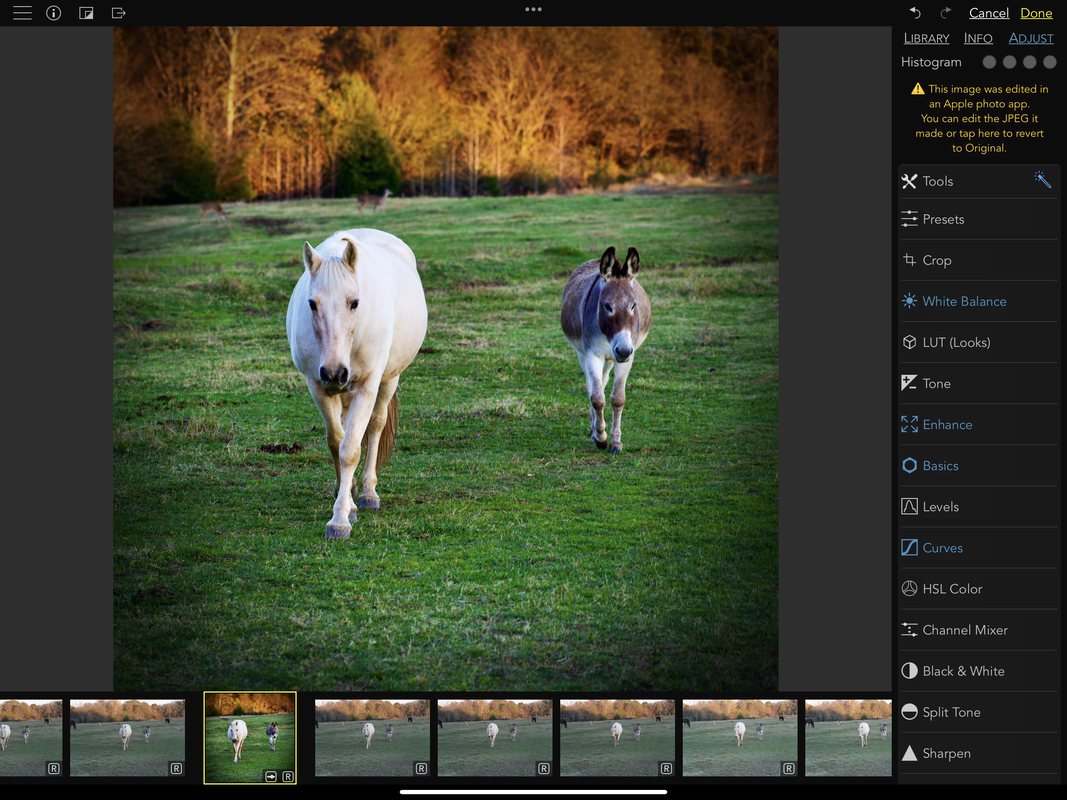
Speaking of photography, I switched my main workflow to the iPad a few months ago.  I cancelled Adobe’s Photography plan and paid a one time fee for Raw Power.  It is very similar but uses iCloud rather than Adobe’s cloud if you want to save flagged files to the cloud.  I will discuss this in more detail in the future, but viewing, editing and flagging photos on the M4 is a treat!  Because of the light feel of such a large screen, I can sit or lay on the couch with the Pencil and get most of my work done.  When it comes to editing, I have invested in several apps over the years.  With the Pencil, I prefer Pixelmator (most of the time), though there are several photo apps that incorporate it.
Picture

Gaming

I also decided to start using this for gaming since the screen is so bright and vibrant.  I got an inexpensive PS4 style controller and paired it up with NBA 2k24 last night.  So much fun!  Looking forward to using it with my Arcade fighting games, as well.  Since Apple One comes with Apple Arcade, I plan to use more of this service to get my money’s worth. I only have so much time to devote to gaming, so the Arcade style is my preference.
Picture

Notes and Drawing

I mainly use the Apple Notes application, but I do have as subscription to Notability, so I may spend some time with it this time around.  Being able to take notes is a real treat with the Pencil.  For a long time, I used the iPad as my main note taking device for work, so I often used the Pencil to scribble down phone call information or take notes in meetings.  Of course, with the new features of the Pencil Pro, we get haptic feedback, a tool bar that pops up when you squeeze it , other customization, and even "find my" support.

My wife is an artist, so I know she will appreciate the updated Procreate with the new Pencil Pro features.  I purchased the app a while back and messed around with it, but never use it all that much and it has been out of mind.  I am going to show the app to her and I know she will love it.  It may cost us the price of another iPad, so holding off on that for now.  LOL

External Display

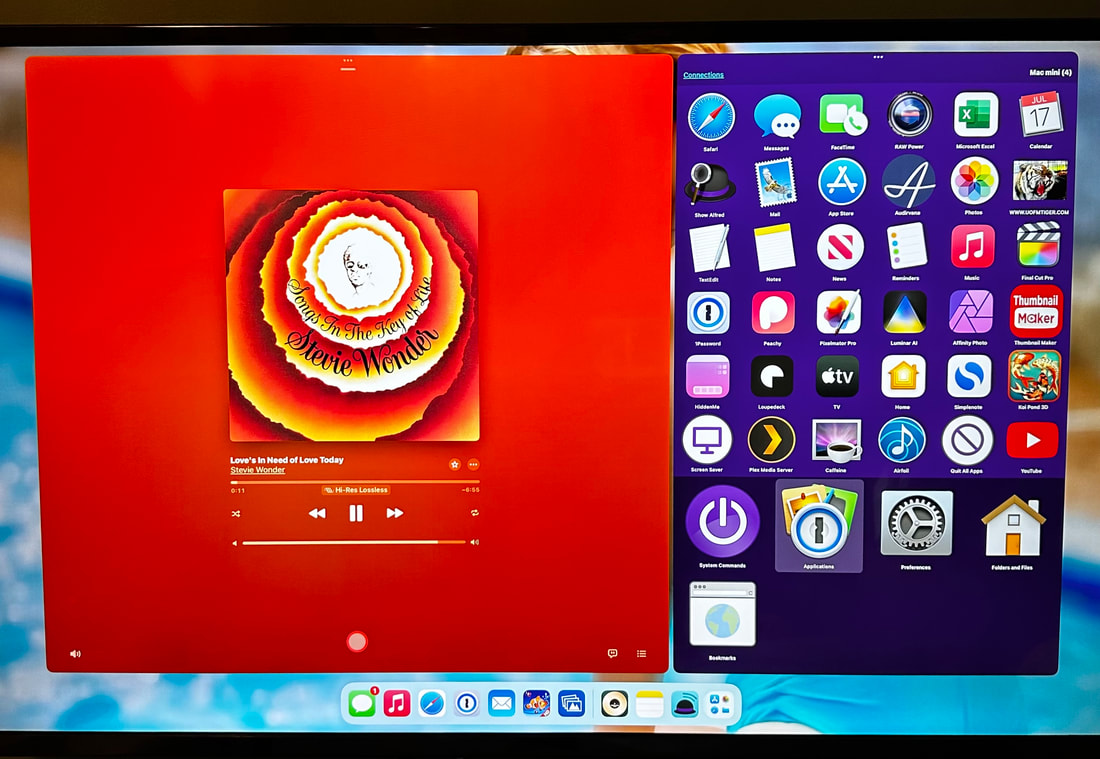
I have multiple ways to connect this to my main displays in my office.  I have the ability to drop it in a dock and see the external screen on my third office screen (a 43 inch Visio).  This allows me to have apps running on a screen above my main Samsung display.  The upside here is universal control with my Mac.  The iPad can share my mouse and keyboard and I can even use the iPad to launch Mac applications with Alfred.  

Secondly, I also use this with the Samsung display.  I have an OWC 13-1 Thunderbolt dock that is connected to two SSDs that I drop my SD Card photos to when I am home or out and about with a more portable dock.   This OWC dock has USB-C in and out, so it also feeds the thunderbolt input on the Samsung. 

​This allows me to use Raw Power on a bigger screen when desired.  It is also just nice for getting all kinds of work done since it shares the DASKeyboard and Logitech mouse I use daily at my desk.  It’s the best typing experience for my needs.  
Picture

Secondary display

I should also mention that it works as a second display for the Mac when I need to use Final Cut when I am on the road (which is rare these days).  It can also be used as the main display with a portable screen for a secondary display on the road.   The iPad is simply a very versatile machine!  Below is an older video that discusses using the iPad with a secondary monitor.

Portable Workstation

When I am out and about, I currently use an Ajazz Bluetooth mechanical keyboard and Logitech Ergo MX mouse.  This mouse uses a ball on top to control the curser rather than needing to move the mouse around, so it can be used on the arm of a chair or in any tight space, when needed.   On my M1 iPad, I used a Logitech keyboard case that I loved, but it was heavy and I rarely used the keyboard, so still looking for a case that will fill my needs on the run.  

I would love the Apple Folio with Keyboard, like they have had for sale in the past.  I have a similar case on my old 9.7 iPad Pro and the design is light and useful when I need a keyboard.  I am keeping an eye out for something similar, but I may just live without being able to use a keyboard on the couch.  In my many years of having a keyboard available with the case, I can can’t on two hands the number of times I have used it that way on the couch. 

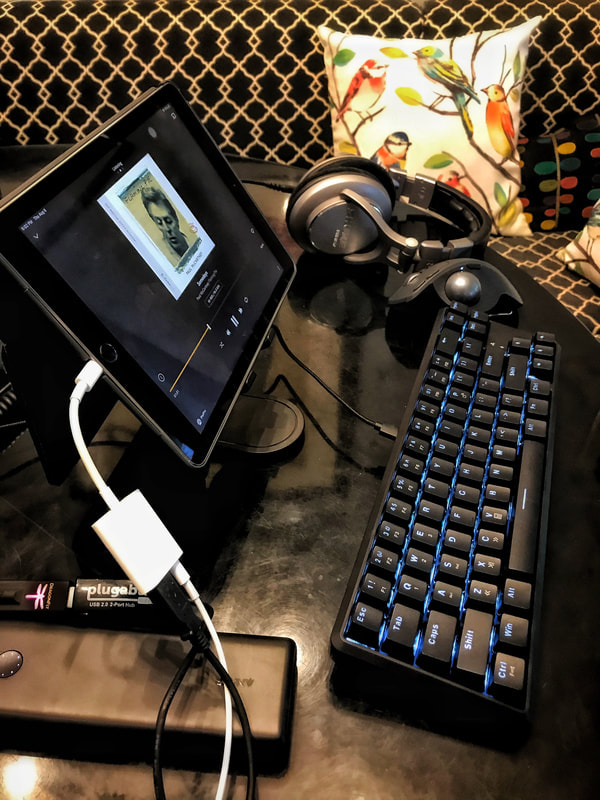
I mainly use the onscreen keyboard or take the iPad to my office to work with my main setup when I have a lot of writing to do.  Right now, I just have a cheap case with cover for protection that I am using and it is working well.  Below is an example of my portable setup.  As you can see, this isn't something I am going to just carry out to the backyard like my Logitech case.  However, on vacation, I can just set this up on the kitchen table and have it available if needed.  As I said, I mainly use the iPad in hand, so this is just a secondary setup when needed.  Not too bad at home since I already have the keyboard and mouse ready and waiting.  The picture has one of my prior iPads, but the basic setup is the same.
Picture

Music

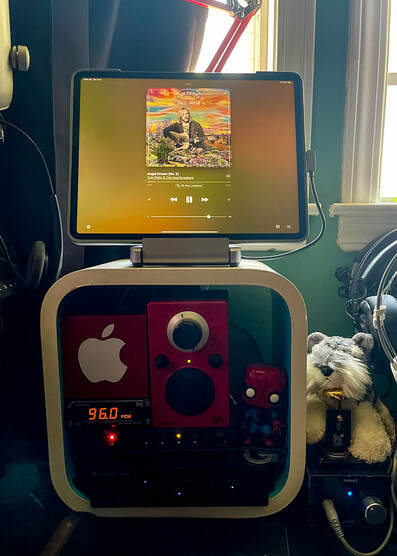
Music is one way that the iPad excels.  It works as a battery operated music streamer with a beautiful display.  As I mentioned, I have a dock in my office with HDMI and USB out.  The HDMI feeds my Visio, but the iPad also feeds my Topping D10 USB DAC.  Unlike the Mac, it does bit rate switching on the fly with Apple Music, so it is a hi res audio streamer.   If you price out a steamer with a display (usually a small LCD nearly impossible to read from across the room), without all of the other things the iPad can do, the $350 iPad could be bought just for audio and make an audiophile smile.  In my case, I need to get more from the iPad, but music streaming fits beautifully into the package.  

It also works great as just a display.  Sometimes, I want to listen to audio via a Wiim streamer via Amazon Music.  I have the Wiim Pro in my living room.  The iPad will display the album art even when I have it sitting across the room.  Finally, there is an app called Now Playing that will listen for music and show album art (and other information about the artist and album), so CDs and Vinyl can still show the now playing information.

While the iPad makes a great music streamer and album display device at home, it is also great on the road.  Paired up with a USB DAC, like HiDisz or Dragonfly, you aren’t always stuck with lower quality compressed music from earbuds (though, those are quite convenient because of the lack of cords).  This will allow for audiophile audio no matter where you are!  Below is my most popular Youtube video (back when the algorithm was nicer to part time YouTubers) showing how this was done several years ago.  It is easier now since Apple went to USB-C.   

Video calls

Since more and more people are using the iPad for video calls, Apple added the camera to the landscape side of the device. Since most cases and keyboard options are geared toward landscape, this was a great decision.  Unfortunately, this meant a complete redesign of the case, so none of the old cases, covers, Pencils, etc… work with it.  

General Computing

It still works for all of my general computing needs…email, the web, home control, security cameras, etc.. The list goes on and on! 

A side note..One of the issues with Apple supplying the same reviewers that reviewed the Mac with iPads, is that these reviewers want to use it like a Mac.  I have seen many of them complain about the thinness when they wanted more battery life.  No, my friends, I much prefer the lighter iPad.  Anytime it’s used like a tablet without a keyboard, it’s a benefit for it to be lighter and easier to hold by hand (though leverage helps, too, because it can lean against the body).    Also, just fitting it in a bag and carrying it with you is easier when it is lighter and thinner.  Personally, if it was the same size and weight of the M1, I would not have bought this model.  If you need more battery life than the 10 hours or so they offer, carry an external battery since you obviously don’t care about weight. 

The Wrap Up

While the iPad is not for everyone, they do fill a huge portion of my computing needs around the house.  The better screen and lighter weight mean I will use this more than my last M1, 12.9 iPad.  It was too bulky and heavy to want to use it on the couch, so I would often turn to my lighter 9.7 iPad.  The old iPad is so much slower that it would cause frustration and I would often just pick up my phone for activities I did away from my desk.  Just the new form factor has made a huge difference in how often I will use this device.  Now I use it all day, while I work, for music (when I am working from home) and use it most evenings to do the activities I mentioned above.  

Did this update change the way I use the iPad?  Well, Apple is still using the same iPadOS (basically) that they updated last year.   We are a few months away from the next update, so some of this remains to be seen.  However, what it does is make me want to use it more often, which when you pay this much for a tablet, using it more often, means you get more value for your money.
Upsides:
Lighter and thinner
Gorgeous tandem OLED
M4 chip makes everything faster - but has potential for future use.
New Pencil features
Better location for front facing camera
The LiDAR Scanner is better

Downsides:
Expensive accessories 
Many Pro apps don't work as well as their desktop counterparts
Expensive in general
Some features require an expensive update to a terabyte of storage.
No Apple calculator app ( this is a joke..I just have seen this so many times, I had to include it for the laugh)

A performance comparison from Max Tech

For those curious about performance difference between the M2 iPad Pro (I upgraded from M1) and the M4 iPad Pro, below is the only video I have seen on the subject.  Even with the old iPadOS 
software, the performance is quite impressive. 
0 Comments

A Defense of iPad

5/16/2024

0 Comments

 
This post is addressing some of the complaints I have heard about the iPad not being "Pro" and not running macOS. It was off the cuff (without even a note about what I would say) and I was trying to keep it somewhat short, so not every single detail and pro/con listed here. Maybe I will write a longer more specific blog post.

I plan to review the new iPad M4 when I get some more time with it under my belt (not just a listing of what Apple already said, but how and why it is or isn't useful).

Sorry, it looks like I recorded in a cave, but if you were watching it on the new iPad M4 display it would look great with inky blacks. :wink

​
0 Comments

iPad is not a Laptop

5/9/2024

0 Comments

 
I wrote an article about this in the past, you may want to check out:

MacBook is not an iPad
Obviously, the tech specs have changed since I wrote that article, but the article is still spot on when it comes to the subject.  Many iPad users benefit from the form factor, the touch display, the pencil input, the (new) incredible screen, the gaming (which is better on the iPad than Mac) and the apps in general.  

Yes, the Mac has some real advantages when it comes to "Pro" software.  Personally, I would pay top dollar for a dual boot machine that works with MacOS and iPadOS.  However, while I see many videos discussing the shortfall of iPadOS compared to MacOS with each new iPad announcement, we don't usually see the opposite.... "Yes, this new Mac is nice, but it doesn't have a touch display, doesn't have all the great iPad apps, doesn't work with Pencil input, etc."   

While these two systems stay separated, there are reasons people would prefer one of the other, depending on how they use them.  I wish more tech reviewers would focus on why some people would prefer the iPad rather than the usual rant about how it's not a Mac.  Apple makes several Macs you can buy if you don't have a need for all the advantages the iPad offers...just stop being so focused on how you use it and look at the broader market overall. Many people prefer the iPad.
0 Comments

2024 iPad M4 Ordered

5/9/2024

0 Comments

 
So, after writing my prior article, I kept thinking about it and I decided to go ahead and order the new 2024 M4 iPad 13.

So why did I decide to order it?  It mainly came down to two reasons.  The first was the lighter, thinner design and the second reason is they gave me $510 for my iPad M1 12.9.

I decided on the base 13 inch model and financed it for a year at around $65 a month for 12 months.   While this is still money, it’s not so much that it will change much in my budget.

Separately, I went ahead and ordered the Apple Pencil Pro.  I just put that on my AmEx that I pay off monthly and bought a cheap folio style case from Amazon ($24).  Unlike a lot of iPad users, I just don’t use an external keyboard very often.  I prefer using it “ in hand” which is why the lighter weight is such a big deal.  When I do want to use a keyboard, I use it at a table because the ergonomics aren’t that great for lap use, though the Logitech keyboard case is better than the Magic Keyboard in that area, if you ask me.  

For now, I will use it with a Bluetooth mechanical keyboard and my Logitech Ergo mouse or share the mouse and keyboard with my Mac Mini when using it in my office.   I always preferred this to the keyboards in iPad cases anyway.  If I do feel like I want a keyboard case down the road, I can always add one.  However, I will probably wait for the price on the Logitech Keyboard case to drop first ( it’s currently listed for around $260 on Apple's website).   It served me well on my 12.9 iPad.  I like having a cover when using it in tablet mode, so that is one of a few reasons I prefer it to Apple’s keyboard.  Also, I really liked the "kickstand" on the cover, so will keep an eye out for a third party option if Logitech's pricing doesn't come down.

There are other benefits… obviously, the gorgeous "tandem" OLED panel.  Some say this stole the show.  I am sorry, if this was attached to another brick, I would not have upgraded.  That being said, our eyes are often more impressed by things they see in a commercial rather than what they may feel.  They also have a new matte version, but I chose not to go that route.    It is supposed to limit contrast and brightness and is only available on the 1 and 2 terabyte models.  The M4 holds promise like no other chip, as well.  It’s billed as their AI chip, which hopefully means we will see some cool stuff introduced with the next version of iPadOS.  The Apple Pencil Pro has some really cool new features, so looking forward to trying them out.

So why did I go with the base version?  First off, I am not even using 100GB of space on my old iPad since I have 2 terabytes of iCloud space.  Secondly, the upgrade in SSD to 1 terabyte is $600.  That’s too much of a premium to pay when I can plug an SSD into the USB-C slot, if necessary.  I have already planned to use it with a dock and multiple drives for backup when I drop photos from my camera’s SD card.  The 1TB model was really the only other option I considered because it gets a few extra spec bumps (more RAM would be one reason to go this route), but I can live with a slightly slower iPad under heavy loads.  I think others may weigh the cost/benefit and choose the 1TB version, so it comes down to your use case.   For me, this is just an iPad I use for editing and managing photos, browsing the web, watching video, reading magazines, listening to music, etc.  Nothing is all that difficult, outside of managing photos and if it takes a couple extra seconds to load, I can live with it.  

I am really looking forward to trying it out.  I can’t really see where it can go wrong when, on paper, it appears to be the perfect iPad for my needs.  I think this should be able to be used for all my needs without it feeling like a brick when I use it in tablet mode.  I am really curious to see how it feels in the hand.
​
0 Comments

The New M4 iPad

5/8/2024

0 Comments

 
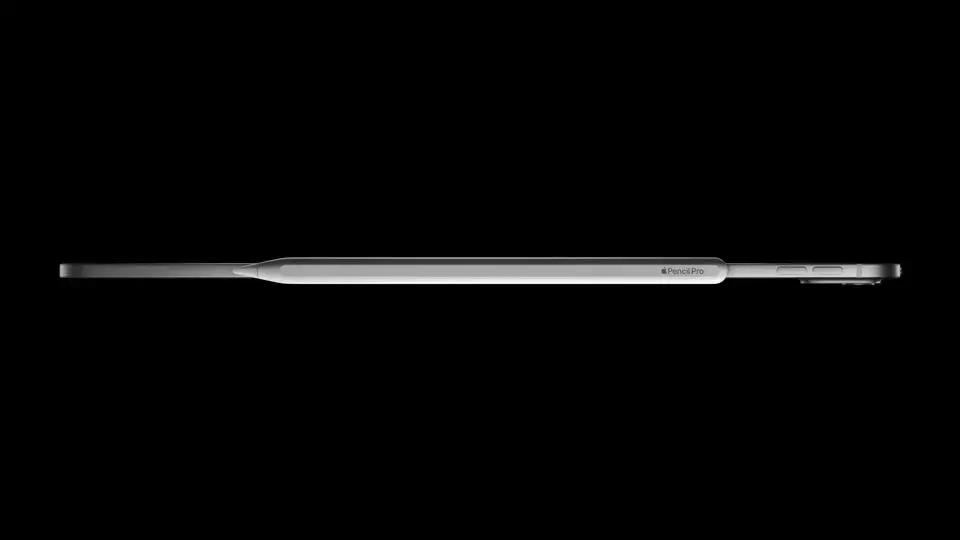
If you have not seen Apple's new iPad, it is like the old iPad, but has a thin, really thin, design, a better chip, and a better screen than the last iPads.
Picture

Should I buy one?

That is the question and a tough one.  For me, the biggest downside to my current iPad M1 12.9 is the weight.  I called it an "uncommonly heavy" iPad in my review.   The obvious resolution to this issue, without giving up screen space, is a lighter, thinner iPad.  The new 13 inch iPad is the thinnest device Apple has ever released.  This should be closer to the initial idea of the iPad.   Also, I can deal with size if I can get something that weighs less.  Currently, I use a Logitech Case that helps me balance the brick-like iPad with its kickstand, but this device combined with a kickstand would be ideal.   I have also thought about going down in size to the 11 inch, but I really like that big display for my photos.  
Picture

Other options?

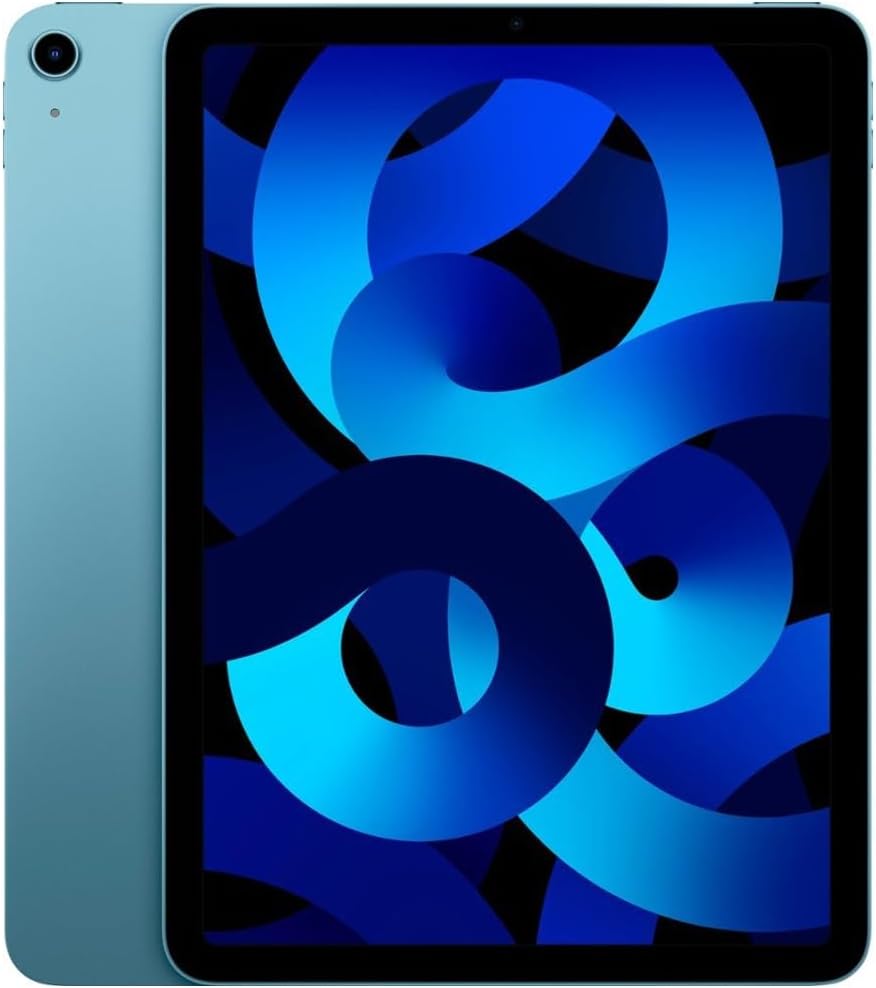
The next best option to getting a thinner iPad to deal with the weight is getting another iPad.  I like the iPad Air 5th Gen for its ability to also fill in as a music server and be able to use "extend my display" like my current M1 Pro 12.9.   However, this would mean juggling two iPads, which may not be as ideal as it sounds.  Yes, it would give me another iPad, so I could use one iPad while the other is playing music.  However, it could result in my iPad 12.9 being rendered to just being used as a music server and a photo editor.   I don't think that this would justify what I paid for it.  It's a bit of a give and take.  The current cost of a refurb model of Air is around $450, but could be higher or lower depending on timing of when I buy it. 
Picture

Cost of the new iPad?

Well, there is the price of the device and then the additional cost of accessories.  Basically, for a 13 inch, the pricing is dependent on the hard drive space I will need.  I think I can get by with 256GB.  Yes, a 1TB would mean I could leave SSD drives at home and just back up photo cards onto the iPad directly.  However, the price for that gets pretty high!  For 1TB versus a 256GB, it is $700 more. I will just carry another SSD for that price.  I looked at my current iPad and it isn't even filling up 100GB thanks to iCloud backup.   

So, for my configuration, I expect the iPad 13 would be $1428 with the new Pencil and without the magic keyboard.  I would probably spend another $100 or so on a different case.  I would like a Logitech similar to what I have now, but I could get by with a folio of some sort that has a light cover and use a bluetooth keyboard when I want to type a lot.  I mainly use the iPad in tablet form, so I am going back and forth on my best option for the case.  When the iPad is at my desk, I use the same mouse and keyboard I use with the Mac.

Apple would also allow me to trade in my M1.  They will give me around $500 for it at the moment.  This would be $928 vs $ 450 using options above.   I am still in the middle of the road on this.  There are benefits going in either direction.  
Upsides to a Second iPad
1.  Costs less
2.  Smaller footprint when I want it
3.  Uses the same Pencil 2 of my M1
4.  Dock and use as a music server while still using the other iPad
5.  A cheaper iPad to carry on the road
Downsides to a Second iPad
1.  Juggling iPads (redundancy)
2.  Will not get many of the new features of the new iPad
3.  Will stop getting updates earlier than a new iPad.
4.  All of the new features missing - slower, worse screen, etc.
Upsides to new iPad M4
1.  M4 chip and what it could mean down the road.
2.  OLED displays
3.  One iPad to rule them all (no juggling around)
4.  Will get updates longer than either iPad.
5.  Thin and light with a big screen
6.  New Pencil features
7.  Many other new features, but these are the most meaningful to me.
Downsides to new iPad M4
1.  Lose benefits of a two iPad setup.
2.  Price (will cost double to have this one iPad compared to having 2)
3.  Accessories - the price of the device is already a lot, but it will require a new case and Pencil.
4.  It still has the iPadOS downsides (though it will also have the upsides)

What to do, what to do?

Honestly, at this point, I am in a wait and see mode.  I really want to see if they have anything coming with the next iPadOS that makes the update worth it for me.  Right now, I have a 9.7 iPad as my secondary iPad, but the battery power is dying and the power of the device is weak.  However, using it for a few months and waiting for answers, makes the most sense.  If I don't see a reason to change for software, I am leaning toward the two iPad solution, if I do anything at all.  I am really impressed with that thin design, but right now, that isn't enough for me to make that leap.
0 Comments

Desire for Better Pizza

5/6/2024

0 Comments

 
While I can’t say that I have ever disliked pizza from any restaurant, I do think there are degrees of “good”.  A few years ago, I was making pizza quite often on my Big Green Egg.  However, the setup, waiting on it to heat up, and ruining and replacing burnt gaskets, etc. was always a pain and part of the reason I haven’t made a pizza on the Egg in a while.
Picture
One other downside is the time and effort to make dough from scratch.  Unfortunately, not much I can do about that.  Yes, there are places that sell dough balls already made and it’s great in a pinch, but not the same as making it at home.
Picture

So why not just buy pizza?  This has a lot to do with knowing the ingredients, making it how I want, and experimenting with different combos.   I also think it saves money in the long run given the cost of pizza and pizza delivery these days.  The piling on of delivery fees on top of expecting a tip and pizza gets quite expensive.  Even eating it out is pricey with the tip, a couple overpriced beers, etc. 

So, my thought right now is to possibly buying an outdoor pizza oven.  This would take a lot of the hassle out of the outdoor cooking process.   If I could make that side easier, I could make more pizza dough with each batch and know I would use them, which would give me more bang for the buck each time I made a batch.

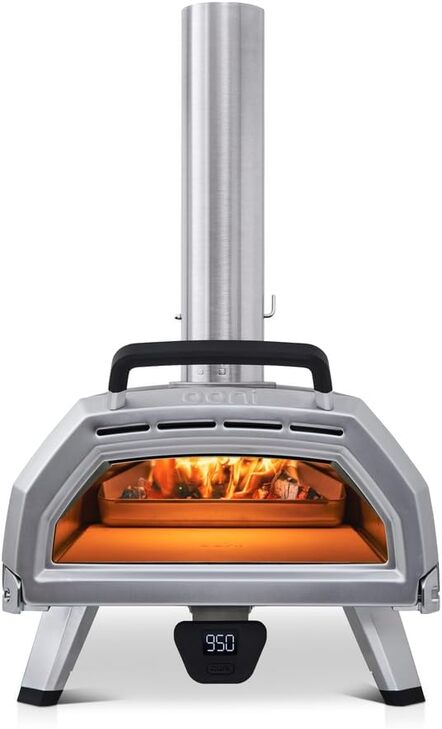
So which oven?  I have pretty much decided on the ooni Karu 16.  This will allow the most flexibility for a few reasons.  First, it’s bigger than its 12 inch counterparts, so more room to cook breads and other things that can benefit from the high heat.  Secondly, the larger size means I can make larger or smaller pizzas and they will be easier to rotate in the oven.  

This model uses multiple fuels, too.  This means on most weeknights, I can quickly make pizza with the propane adapter.  On the weekends, I can use wood or coal as fuel and turn out a more New Haven style apizza.  

Note:  I get paid commissions for purchases made through any links to Amazon products on this page and website.
Picture

Right now, we have too much going on to spend any time with it, but things will ease up in a few weeks, so I will hold off buying it for the moment.   However, I know it will eventually be in my backyard churning out spectacular pizza with the ingredients that I want to use.  With pizza being my favorite food, the idea of having a pizza oven available is pretty darn compelling!  ​​
Picture
0 Comments
<<Previous

    About me:

    Dog loving, Big Green Egg worshiping, Tech enthusiast, residing in Memphis, TN.  Home of the Tigers, Grizzlies, Elvis, Al Green, Stax, Hi Records, Ardent Studios, Beale Street, Peabody Ducks, etc..  I have also added the Jeep Wrangler to the list of things I am enthusiastic about.

    Archives

    January 2025
    December 2024
    November 2024
    October 2024
    September 2024
    August 2024
    July 2024
    June 2024
    May 2024
    April 2024
    March 2024
    January 2024
    December 2023
    November 2023
    July 2023
    March 2023
    February 2023
    January 2023
    November 2022
    October 2022
    September 2022
    July 2022
    March 2022
    February 2022
    November 2021
    October 2021
    September 2021
    July 2021
    May 2021
    December 2020
    October 2020
    August 2020
    July 2020
    June 2020
    May 2020
    April 2020
    February 2020
    January 2020
    December 2019
    November 2019
    October 2019
    September 2019
    August 2019
    June 2019
    November 2018
    October 2018
    September 2018
    July 2018
    March 2018
    February 2018
    January 2018
    December 2017
    November 2017
    October 2017
    September 2017
    August 2017
    June 2017
    May 2017
    April 2017
    February 2017
    January 2017
    December 2016
    November 2016
    October 2016
    September 2016
    August 2016
    July 2016
    June 2016
    May 2016
    April 2016
    March 2016
    February 2016
    January 2016
    December 2015
    November 2015
    October 2015
    September 2015
    August 2015
    July 2015
    June 2015
    May 2015
    April 2015
    March 2015
    February 2015
    January 2015
    December 2014
    November 2014
    October 2014
    September 2014
    August 2014
    July 2014
    June 2014
    May 2014
    April 2014
    March 2014
    February 2014
    January 2014
    December 2013
    November 2013
    October 2013
    September 2013
    August 2013
    July 2013
    June 2013
    May 2013
    April 2013
    March 2013
    February 2013
    January 2013
    December 2012
    November 2012
    September 2012
    August 2012
    July 2012
    June 2012
    May 2012
    April 2012
    March 2012
    February 2012
    January 2012
    December 2011
    November 2011
    October 2011
    September 2011
    August 2011

    RSS Feed

    Categories

    All
    135i Convertible
    16GB RAM MBP
    1 Series
    2010 Mac Mini For Media
    2011 MBP Dock
    2016 MBP
    2016 Office Tour
    2018 Mac
    2024 IPad
    328i Convertible
    3gs
    3rd Generation Ipad
    3rd Gen Ipad
    3 Series
    413j
    4K Dock
    4k FireTV
    4k Media Streaming
    4k TV
    4s
    5d Mark Iii
    5d Mark Iii Vs Nikon D800
    5d Mkiii
    5 Inch Iphone
    7 Cities Album Review
    85mm Review For Sony
    Air Display
    Airfoil
    Airfoil Speakers
    Airfoil With Echo
    Airfol
    AirMusic Player
    Airplay
    Airplay 2
    Airplay Mirroring
    Airplay Watch
    Airpods
    Airport Express
    Airport Express Airplay
    Alexa
    Alienware M15 R4
    Amazon
    Amazon Echo Dot
    Amazon Echo Dot Review
    Amazon Music
    Amazon Prime
    Angels Horn
    Angels Horn Review
    Anova Bluetooth Review
    Anova Precision Cooker
    Anova Suos Vide
    App
    Appel Watch
    Apple
    Apple And Sonos
    Apple Cinema Display
    Apple Has Awful Customer Service
    Apple Headphone Jack
    Apple HomePod
    Apple Is Doomed
    Apple LIghtning To USB Adapter
    Apple Lossless
    Apple Mac
    Apple Music
    Apple-music
    Apple-music-app-of-the-year
    Apple Music Beta IOS 10
    Apple Music Beta On IPad
    Apple Music Lossless
    Apple Music Mastered For ITunes
    Apple Music - Mastered For ITunes
    Apple Music Mastered For ITunes
    Apple Music Matching
    Apple Music Preview IOS10
    Apple Music Review
    Apple Music Siri
    Apple Music Suggestions
    Apple Music Watch
    Apple Music Wishlist
    Apple's Customer Service Is A Joke
    Apple Spartan
    AppleTV
    Apple Tv2 Airplay
    Apple TV 3rd Gen
    Appletv 4
    AppleTV 4 And Airplay 2
    AppleTV 4th Gen Review
    AppleTV 4 Wishlist
    AppleTV Wishlist
    Apple Watch
    Apple Watch 1 Year
    Apple Watch Apps
    Apple Watch As Remote
    Apple Watch December 2015
    Apple Watch Review
    Apple Watch Ultra
    Apple Watch Ultra - Tech Of The Yeart
    Apple Watch Vs Mechanical Watch
    Apple Watch With Airplay
    Apple Wishlist
    Apple Wishlist 2016
    Apps
    Arlo Q Review
    Arlo Wireless Review
    Audio
    Audiophile Reviews
    Audioquest Dragonfly Review
    Audiotap App
    Audirvana
    Audyssey
    Backups
    Backyard Cooking
    Bakersfield Review
    Battery Power
    BBQ
    BBQ Guru DigiQ Review
    Beats Music
    Beats Music IOS
    Beats Music Review
    Best Cloud Services
    Best IOS Apps 2015
    Best IPad Apps (2015)
    Best IPad Case
    Best IPhone Apps Of The Year
    Best Office Setup
    Best Sounding Bluetooth
    Best Stuff 2024
    Best Tech
    Best Tech 2021
    Best Tech 2022
    Best Web Services
    BFG KO2
    Bge
    Bge Table
    Big Green Egg
    Birsket On The BGE
    Black Rapid
    Bluetooth
    Bluetooth Headphones
    Bluetooth Keyboard
    Bluettooth Headphones
    Bmw
    Bmw Apps
    Bourbon Decanter
    Brisket
    Brisket On The Big Green Egg
    Brisket Pizza
    Cablecard
    Camptune
    Canon
    Canon F4 Zooms
    Canon Selphy Review
    Canon Wishlist 2016
    Canon Zooms
    Cars
    Case With Bluetooth Keyboard For IPad
    Case With Keyboard For IPad Air 2
    Ceramic Grill Store
    Charge IPad While Using DAC
    Cheap HiRES
    Checklist For Sous Vide
    Christmas Ideas 2021
    Chromecast Audio
    Chromecast Vs Airplay
    ClipR
    Clockology
    Cluttered Home Office
    Coach Pastner
    Consumer Reports
    Convertible Laptop
    Cool Tools - A Catalog Of Possibilities Review
    Cool Tools Book Review
    Crashplan+ Family Plan
    Crashplan Review
    Crashplan+ Review
    Crashplan Seed Review
    Crazy Room Setup Video
    Cuisinart
    Cuisinart ICE-21 Review
    DAC
    Denon
    Denon 4311CI
    Design Trends That Aren't Practical
    Desk Tour
    Desk Update
    DigiQ For BGE
    Directv Genie
    DLNA
    Dog Anxiety
    Dog Gadget
    Dog Tech
    Dog Thunderstorm Solutions
    Dragonfly DAC
    Dragonfly DAC With IPhone 6 Plus
    Dragonfly Usb Dac
    Dragon Glasses
    Drone
    Ds413j
    Earbuds
    Echo Dot For Music
    El Capitan Install Problem
    Elegant Designs
    Elgato Dock Review
    Elgato Thunderbolt 2 Dock Review
    Elliptical
    E Pl5
    E-pl5
    Epson 2040 Review
    Ergotron MX Mount
    Esr Case
    Extending Wifi
    F4 Preference
    Ff Vs M43
    Fidelia
    Fix El Capitan Install Issue
    Folding Keyboard
    Full Frame Vs Miro Four Thirds
    Gadget Backpack
    Gaming Projector
    George Foreman Grill
    Gift Ideas
    Gps App
    Grill
    Grilling
    Grilling Out With A Griddle
    Hadley
    Harken Hoister
    Hdmi To Ethernet
    Headlamp
    Headphones
    Headphone Stand
    Headphone Stand Review
    Heed CanAmp
    Hi Rez Music Overrated
    Hi Rez Vs Redbook Audio
    Home Design Ideas
    Home Office
    Home-plug-and-airplay
    Homepod
    Homepod-compared
    Homepod-review
    Homepod-review
    Homepod-with-echo
    Homepod-with-j-river
    Homepod-with-plex
    Home-surveillance
    Home Theater
    Hot
    Hot85a534125d
    How I Use The 2024 IPad
    How-to-use-that-old-iphone
    Hp-4k-display-review
    Hp-spectre-32inch-studio-display-ledlit-monitor-review
    Hue-lights
    Huge-bluetooth-speaker
    ICatcher App
    Imac
    Imac-ssd-thunderbolt-upgrade
    Imac-ssd-thunderbolt-upgrade
    Imac-thunderbolt-2-dock-review
    Imac-with-second-monitor
    In Defense Of Tim Tebow
    Inexpensive Home Theater
    Inexpensive-home-theater
    Intuos 4
    Ios
    Ios-10
    Ios-lightroom
    Ios-multiple-room-airplay
    Iososx-hybrid
    Ios-remote
    IPad
    Ipad2
    Ipad 3
    Ipad Accessory
    IPad Air
    IPad Air 2
    IPad Air 2
    Ipad-air-2
    Ipad-air-2-audio
    Ipad-air-2-vs-ipad-3
    Ipad-apps
    Ipad Battery
    Ipad-battery-pack
    Ipad Battery Running Slingbox
    Ipad-bluetooth-keyboard
    IPad Case
    Ipad-case
    Ipad Consumer Reports
    IPad Desktop
    Ipad Doesn
    Ipad Hot
    Ipad-kelbyone
    Ipad Killer
    Ipad-lightroom-app
    Ipad-lyndacom
    IPad M1
    IPad M4
    IPad M4 13
    IPad M4 Review
    Ipad Mini
    IPadOS
    Ipad-photography
    Ipad-pro-97
    Ipad-pro-97-review
    Ipad-pro-97-vs-ipad-air-2
    IPad Rather Than
    IPad Replace
    Ipads Fatal Flaw9e14764628
    IPad Vs Mac
    Ipad Warm
    Iphone
    IPhone 14 Pro Max
    Iphone 4s
    Iphone 5
    Iphone-6-plus
    Iphone-6-plus
    Iphone-6-plus-case
    Iphone-6-plus-inexpensive-case
    Iphone-6-plus-in-hand
    Iphone-6-plus-review
    Iphone-6splus-best-accessorires
    Iphone-7-plus
    Iphone-7-plus-jet-black
    Iphone-7-plus-review
    Iphone-accessories
    Iphone Airplay
    Iphone-apps
    Iphone-apps-2015
    Iphone-battery-pack
    Iphone Case
    Iphone-headphone-jack
    IPhone X
    Ipod
    Is Apple Music Perfect?
    Is Hi Rez Worth It?
    ITunes
    ITunes Lossless
    Jazz - Mastered For ITunes
    Jazzradio Airplay
    Jeep
    Jeep Accessories
    Jeep Cabin Curtain
    Jeep Cargo Cover
    Jeep Wrangler Accesories
    JKU SeatCovers
    JKU Seat Covers
    JKU Updates
    J River Airplay
    J River With Echo
    Karu
    Kelbyone Review
    Kettle-Q Review
    Kindle
    Kindle Fire
    KitchenAide Mixer
    Kohler Mirror
    Kurt Kinetic
    Lacie Drive
    Lending Service
    Lexi
    Lexi IOS App
    Lifeproof
    Lifeproof Case For Ipad
    Lifeproof Case For Ipad Review
    Lifeproof Case Review
    Lifeproof IPhone 4s
    Lightroom
    Lightroom Mobile
    Liquid Spirit Album Review
    Living Room
    Living Room Projector
    Lodge Cast Iron
    Lossless Audio
    Loudness Wars
    Lynda.com Review
    Lynda.com Vs Kelbyone
    M43
    M4 Accessory
    M4 Ipad
    Mac
    Mac Apps
    Macbook Pro
    Mac Mini
    Mac Mini Home Theater
    Mac Mini Living Room
    Mac Mini M1
    Mac Mini Media Maven
    Mac Mini Media Server
    Mac Mini Remote
    MacOS
    Magic Keyboard
    Make Any Headphones Wireless
    Marantz 2220b
    Mastered-for-itunes
    Maverick Et732
    Mbp
    Mbp Accessory
    Mbp-mid2011-ssd-upgrade
    Mbpr
    Mbp-ssd-update
    Melophobia Review
    Memphis Basketball
    Modernize
    MOG
    Mog Airplay
    Mountain Lion
    Mountains Of Sorrow
    Mount IPad To Mac
    Movie Streaming
    Multiroom Airplay Audio
    Music
    Music Streaming
    My Favorite Items 2024
    Nas Vs External Hard Drive
    Netgear Router
    New Ipad
    New Ipad Hot
    New Ipad Review
    New Ipad Tests
    New Year Resolutions For Tech 2015
    Nfl Tebow
    Ninja Blender Review
    Ninja Dough
    Ninja For Pizza
    Ninja Mega System Review
    Noise Cancelling Headphones
    Nvidia Shield
    Nvidia Shield Review
    Nyne Cruiser
    Office Setup 2016
    Old IPad
    Olympus E Pl5
    Olympus E-PL5
    Olympus E-PL5 Neck Strap Review
    Olympus With Canon Adapter
    Online Backup Review
    Online Photography
    Ooni
    Orbi Modem
    Orbi Wifi
    Original Ipad Vs New Ipad
    OSX Apps
    Outdoor Cooking
    Overrated Home Design Ideas
    PA2V2 Headphone Amp
    Parrot Anafi
    Parrot Zik 2.0 Headphones
    Parrot ZIk App
    Pcworld Has A Messed Up Ipad
    Pcworld Ipad 3 Battery
    PDP Pixel Pal Ren And Stimpu
    PDP Pixel Pals
    Petzl Tikka Improved Lumen Output Xp 2 Headlamp
    Phone 6 Plus Video
    Photo Airplay
    Photography
    Photography Classes On The Ipad
    Photography Videos For The Ipad
    Photography Videos On The Iphone
    PIlates
    Pilates Reformer
    Pixel Art
    Pizza
    Pizza On The Big Green Egg
    Plex
    Plugable USB Hub
    Plugbug
    Portable Hard Drive
    Portable HD Projector
    Portable SD Reader
    Power Bank
    Power Dots
    Power Line Ethernet
    Powerline Ethernet
    Powerline Ethernet And Airplay
    Projector
    Projector Setup
    Pulsar
    Pure I20
    Random Tech
    Rdio
    Rdio Is Best
    Regear To 4.88
    Remote Control App
    Repartition Bootcamp
    Retina
    Ring Doorbell Review
    Rivers Of Song Review
    Rock Music: Mastered For ITunes
    Roku
    Roku 4 - Best 4k Option
    Roku 4 Review
    Roku 4 Vs Nvidia Shield
    Roomie Remote App
    Roomie Remote Review
    Rugged Case
    Samsung 840 EVO MBP
    Samsung UltraWide
    Seagate Backup Plus Desktop Thunderbolt Adapter
    Seagate Desktop Thunderbolt Adapter
    Security Camera
    Setup Video
    Shiatsu
    Shure
    Shure 940
    Shure Sh940
    Shure SRH940s
    Simple Control
    Simple Control App With Echo
    Simple Control - Voice
    SimpleControl Watch
    Siri
    Siri And Apple Music
    Siriusxm
    Siri With Apple Music
    Sitting Exercise
    Smarthome
    Smartplugs
    Smoked Brisket
    Smokeware SS Vented Chimney Cap
    Sonos
    Sonos Connect
    Sonos Or Airport Express
    Sonos Vs Airplay
    Sonos Vs Mac Mini
    Sony A7 Lens
    Sony Bluetooth
    Sony Camera
    Soundsource
    Southeastern Album Review
    Speaker For Biking
    Spotify
    Srh940
    Srh940414fd02963
    Ssd-portable-drive
    Standing Desk
    Steelseries-siberia-elite-prism
    Stepper
    Stereo
    Stero
    Stir Fry
    Streaming Itunes To Iphone
    Streaming-music-is-it-for-you
    Streaming Music To Itunes
    SUmmer
    Summer Essentials
    Superchips
    Sweet Mac Setups
    Synology
    Synology Nas
    T3Hub Substitute
    Tamron 17-28
    Tech
    Tech Backpack
    Tech Gadget Bag
    Tech GIfts
    Tech Wishlist
    Tech Wishlist 2016
    Ten Best Apps For Mac
    Terflex 2.5 Lift
    T-Fal Skillet
    The Most Advanced Headphones In The World
    Thunderbolt
    Thunderbolt 2 Dock
    Thunderbolt 3
    Thundershirt
    Thundrebolt
    Tidal
    Tidal Review
    Tim Tebow
    Tivo Bolt
    Tivo Bolt Review
    Tivo Mini
    Top IPad Apps
    Top Jeep Accessories
    Top Tech 2018
    Top Tech 2021
    Top Tech 2022
    Top Tech List 2015
    Top Tech Of The Year
    Top Ten Albums 2013
    Top Ten Apps For Web Services
    Top Ten Cloud Apps
    Top Ten IPad Apps
    Top Ten Tech
    Top Ten Tech 2012
    Top Ten Tech 2013
    Top Ten Tech 2024
    Top Ten Tech 2105
    Toshiba Convertible Review
    Toshiba Laptop Review 2016
    Toshiba Satellite Fusion 15 Review
    TP-Link RE200 AC750
    Travel Tech Bag
    Trektop NX
    Tripod Projector Screen
    Tuffty Security
    Turntable
    Turntable Review
    TV Sound To Headphones
    Ultimate Mac Office
    Ultimate Office For Music
    Ultimate Office Setup 2015
    Ultimate Setup 2016
    UltraHD 32 Inch Monitor Review
    Under 5-
    Under $50 Gifts
    Unvarnished Album Review
    Uofmtiger Photography
    Uofmtiger's Mac Attack
    Uplift Desk
    USB-C
    USB SSD
    USB Turntable
    Use This
    Vacation Tech
    Vehicle Cupholder Mount For 6 Plus
    Victorinox Knife
    Videogear
    Vintage Receiver
    Vitasound PAE-200 Review
    Vudu
    Vudu Disc To Digital Review
    WHAALE App
    What Is A Pro Laptop?
    What They Use
    Whiskey Glasses
    Why Apple Music Will Succeed
    Why I Chose The 5d Mark Iii
    Wifi
    Wiim
    WiiM Airplay 2
    Wiim Audirvana
    WiiM Hi Res
    Wiim Hi Res Update
    Wiim Mini
    Wiim Mini 24/192
    Wiim Ultra
    Wiim ULtra Review
    WiiM Update
    Wiim UPNP
    Wild Feathers Review
    Willie Sugarcapps Review
    Windows And Mac Video Setup
    Wired Airplay
    Wired Airport Express
    Wireless Security Cam
    Wok
    Work Stations
    World Boogie Is Coming Review
    Wrangler Accessories
    Wwdc Review
    Zoom Modem
    Zuli Review
    ZyXel 600mbps Powerline AV2 Gigabit Adapter ZyXel 600mbps Powerline AV2 Gigabit Adapter