• Home
  • Blog
  • Mac Attack
  • Photo/Gear
  • More Apple
  • Den/HT
  • Essentials
  UofMTiger Tech
UOFMTIGER'S DEN

Mac Mini Media Maven

9/6/2014

0 Comments

 
Picture
In 2010, I bought the Original iPad and it inspired me to take another look at Apple products.  I really didn't want to spend over $1000 to see if I liked using a Mac, so I was drawn to the (much cheaper) Mac Mini.   I ended up buying a 2010 mid-year Mac Mini a few months later.  I figured that I would eventually just put it in my home theater whether I liked it or not.

Note:  I get paid commissions for purchases made through any links to Amazon products in this post.

The 2010 Mini is not the highest spec'd computer.  It has a 2.4Ghz Intel Core 2 Duo processor and I upgraded the RAM to 8GBs.  However, the small size, energy efficiency, and quiet fan make this computer a perfect compliment for most home theaters.  

Before I discuss the way I use the Mini, I do want to mention that I looked into playing hi-rez movie soundtracks (True-HD and DTS-HD) and it was not supported the last time I checked.  If this is important to you, I would recommend researching further or just picking up a Windows computer instead.  You can hook up a Blu-ray drive to the mini, but you would need special software to play it and (from what I understand) you would still lose the hi rez soundtracks.   

I discovered that I liked OSX mainly because it gave me a different experience at home than at work, where we run Windows.  As a result, in 2011, I bought an iMac, which freed the Mini to be used exclusively for media.   However, I decided to keep it sitting on my desk in the office since my office shares a wall with my home theater system and it would give me easier access since I could use the DVI output to feed a monitor in the office and "mini-display to HDMI" to feed a Denon receiver in our living room (where we keep our "home theater").   I simply mirror the display so that the same thing shows up in both rooms.   I believe there may be a performance hit for mirroring, but it runs fine, so I haven't tried to get around the issue, which would be easy with an HDMI splitter.  Another advantage of having it in a separate room is that the fan can get louder if you are doing something that taxes its power reserves.  

The most important aspect of using a Mini for media is the programs you decide to use with it.  Below is a list of some of the most useful programs that I run:

1.  iTunes -  I don't have a problem using iTunes to manage my music.  If you have an iOS device (and  I would highly recommend getting one to use with the Mac Mini) there is a "Remote" app from Apple that will control playback and make it easy to chose music from your library.  If you have Airplay devices, you can also choose where the signal is played.  It works with multiple Airplay speakers without Airfoil, so that is a plus, as well.

2.  Audiotap - This is an app that runs alongside iTunes.  It is for streaming your music to an iDevice anywhere that has an internet connection. It will work with lossless files on wifi.

3.  Plex - This is a slick media interface that will allow you to access your own media and some plug ins (like Cnet video and Twittv).   Plex also has a well received paid service that I don't currently use.

4.  XBMC (soon to be Kodi Entertainment Center) - This is a bit geekier than Plex.   It is more of a hobby,  but has more third party apps available.  

5. Rowmote - As I mentioned, I recommend an iOS device to control the Mini and this is an amazing app that will allow you to use that iOS device as a keyboard and mouse.  Since I have the Mini in a separate room, I do have a regular keyboard and mouse hooked to them, but most of the time  I control it with my iPhone.  One other cool thing about the app is that has a list of applications, and when you click on one, it will launch.

6.  Splashtop - You can also use this to control the Mac Mini via an iOS device or laptop.  The plus to this is that you can take complete control of the computer without needing to have your TV on.  Very useful for music.

7.  Rdio/Spotify -  I have both of these in use now.  Spotify currently has better sound quality and you can control it running on your computer via "Remoteless" app on iOS or Splashtop.  Rdio can be controlled, once you have it playing, with the Rdio app on your iOS device.  I prefer Rdio unless I need ultimate sound quality, which unfortunately is a lot of the time.

8.  Airfoil - This app will allow you to send any audio from your Mini to any Airplay device.   I have numerous Airplay devices, so this comes in handy.  One cool feature is that it will turn your Mini into an Airplay receiver and then you can send audio to any or all of your Airplay devices.   There are also a couple Airfoil apps for iOS.   Airfoil Speakers (for iOS) will turn your iPhone/iPad into an Airplay receiver for your computer.  AF Remote app (for iOS) lets you control the Airplay devices that will receive a signal without sitting in front of a computer.  It will also provide some control of the audio program that is playing, like volume, stop and play.

9.  Roomie Auxillary  - I have written about Roomie Remote for iOS and this plug-in works great.  It allows the user to launch and control programs at the touch of a button.  

9.  Eyetv HD -  I use this to occasionally record programs from Directv.  It receives a signal from the component outputs on the satellite box and sends the signal to the Mini via USB.  It can't record surround sound, but it is still useful. It also streams to iPads and iPhones and can be Airplayed to AppleTV.

10.  Slingbox - For me, this is a better way of getting TV on the Mini.  Its a box that plugs into a satellite box and ethernet and will display the signal on the Mini (or iOS device).  It won't record programs like the Eyetv, but it is less "buggy" for streaming a signal wherever you are (with internet).   When the Directv box in our home theater started to have issues, we used the Mini to stream video from our satellite box in the bedroom until we were able to get Directv out to fix it.  

11.  Kylo -  This is an interesting app that will allow you to easily launch sites like Netflix, Pandora, etc..  It essentially a web browser with links to some of the most popular sites and it can be resized for easier viewing on a television.  It hasn't been updated in years, but their site still has it available for download.

12.  Fidelia - This is a somewhat expensive app that improves sound quality of your files on a Mac.  I mainly use it for its nifty headphone settings. It also has a useful iOS app so you can control the music (similar to the Remote app).

13.  Bitperfect - another app for improving sound quality from the Mac.  It works with iTunes, so you can control it with the Remote app.  It is also a lot cheaper than Fidelia, will perform bitrate changes on the fly (in other words, if you play a 16/44.1 file and then play a 24/96 file it will play them in their native resolution. iTunes doesn't.), but it doesn't have the great headphone features of Fidelia.  I also use the Mini to feed a headphone setup using a USB output, so I like those extra features.

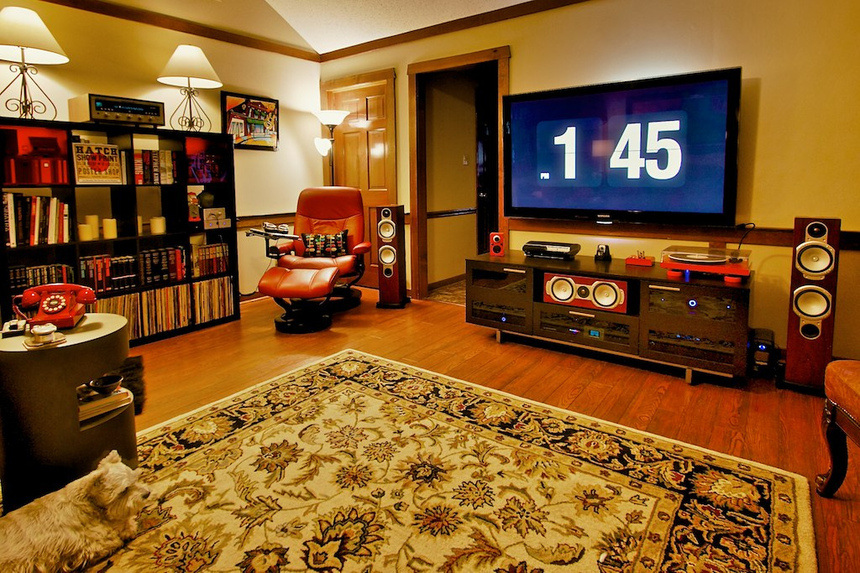
14.  I also run some special screensavers, one is clock like you see in the pic below the article and the other is an aquarium app that has realistic fish that swim across your screen.  There is another that pulls up album art.

The above are the main apps I run from OSX, but you can always find others to fit your taste and needs.   For example, some people don't like iTunes, so there are options that might fit their needs better.   I should mention that Vudu has an issue playing HDX files on my Mini.  It says there are HDCP issues so it will only play SD files.   As a result, I usually use Roku if I want to watch a movie on Vudu.   I have read about some third pary HDMI splitters that strip the HDCP, but I have never used them.

Besides the numerous ways to play music directly, it also serves up files to Appletv via iTunes and Roku via Plex.   It can also run apps like Tversity that work well with the PS3.

One benefit of using Macs is that they are easy to partition with Bootcamp and can also use Windows. At one point, I prefered Windows Media Center to Plex, so I run Windows8 (I "upgraded" from Win7) via VMWare Fusion (an app that allows both operating systems to be running and accessible at the same time). I also have JRiver Media Center running on Windows (bought it before it was added to OSX).   This is just another media app, but it is cheaper than Fidelia and has some of the same headphone settings.  It sounds great and you can also control it with an app called JRemote.  JRemote works with DLNA devices and Airplay devices.   Obviously, with a Windows partition, you can play some lower-end (less taxing) games.  If you go this route, you will probably want a real mouse rather than using an iOS device as a remote.   I have never used it this way, but I may try it at some point.

As you can tell, the Mini has some great media server features and, for me, it's benefits outweigh some of its shortfalls. The fact that it burns little electricity and can run more apps than my NAS makes it the perfect compliment to the many audio and video systems I have around the house. If you are thinking about going this route and have questions, please leave a comment or send me an email.

Picture
0 Comments

Airplay to several devices from iOS using Airfoil

5/29/2014

0 Comments

 
Picture
I wrote an article about Airplay vs Sonos and got a question about how someone would go about sending an audio steam from an iOS app to several Airplay devices at the same time.  

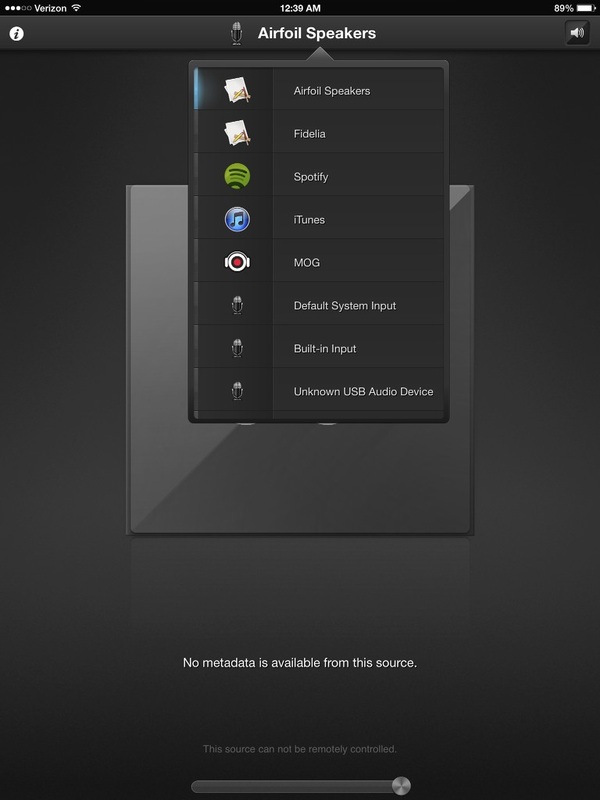
The only way, that I am aware of, requires a computer.  Obviously, you could use Logmein or some other Remote Desktop iOS app to take control of a computer and just run Spotify (or another music app) on the computer and use Airfoil ($25) to send that audio stream to any or all Airplay receivers in your home (I blogged about Airfoil in the past).   I used this process with great success before Rhapsody (which I used at the time) had an iOS app.

Also, right now the Airfoil Remote app ($5) on iOS will allow you pick a preselected program from a list you created and steal the audio from it:

Picture
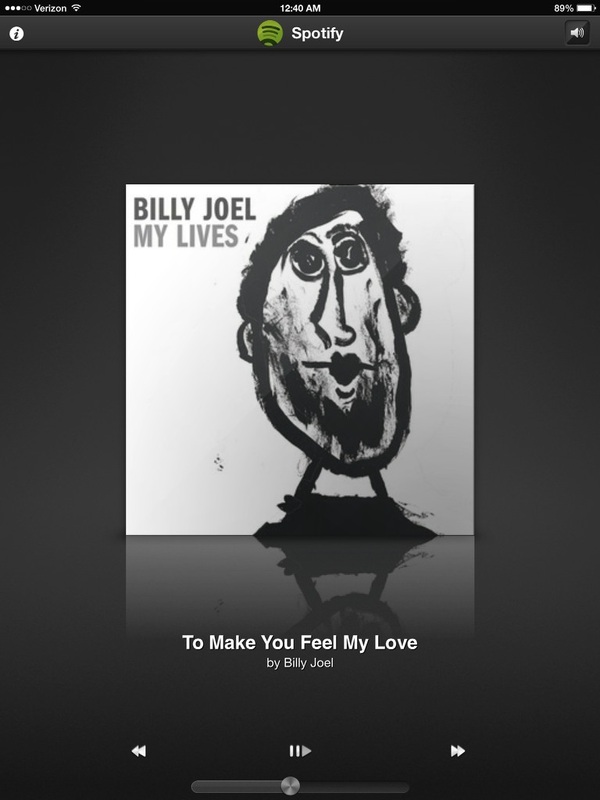
If you choose Spotify or one of the other popular apps they support, you will gain playback control and metadata with album art:
Picture
If you don't want to take control of the computer directly, you can also run Airfoil Speakers on the computer.  Airfoil Speakers allows the computer to behave like an Airplay receiver.  This comes in handy when you just want to listen to audio from your iPhone over your computer's speakers.  You simply start Airplay Speakers on your computer, then it will show up on your iOS device as an Airplay speaker.  Once you choose the computer from your Airplay device list in iOS, your iOS device will send the audio stream from almost every app to the computer.  

Once Airfoil Speakers is capturing the audio from the iOS device, you can then use Airfoil to capture that stream and send it to any or all of your Airplay devices.   The Airfoil Remote app will allow you to control which speakers will receive music and even let you individually control the volume of each of those speakers.

In other words, you just run Airfoil Speakers and Airfoil (two applications) on a computer and then just pick the computer as the receiver for your iPhone.  It works great for music and podcasts.

I should mention that Airfoil Speakers for the computer and iOS, is part of the regular Airfoil pricing.  It can also be installed on an iOS device and it will enable you to send audio to the iOS device from a computer.  Really cool stuff. 

0 Comments

DS Audio App for iOS

3/16/2014

2 Comments

 
Picture

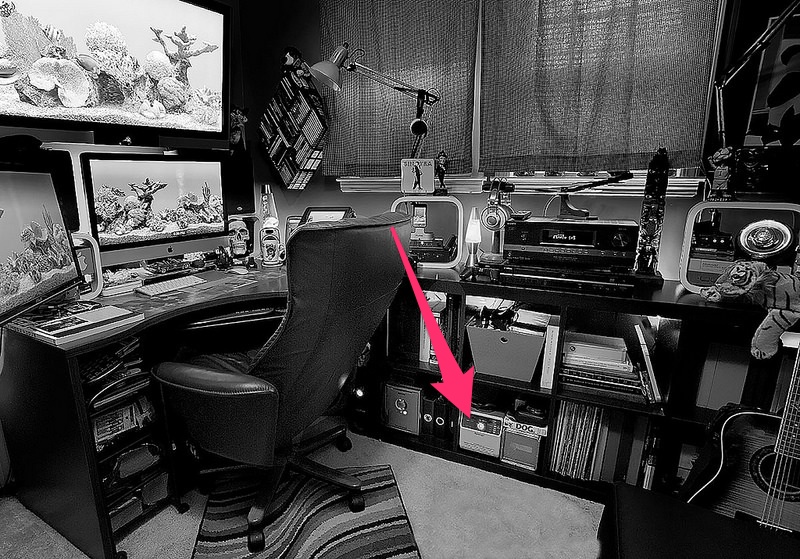
In the picture above,  you can see a big arrow pointing at the Synology 413j NAS that I wrote about a while back.  While I mainly bought it for backing up various computers and hard drives, it also has some cool features.   One of my favorites is the DS Audio app.

Note:  I get paid commissions for purchases made through any links to Amazon products in this post.

First you have to log into the Synology and download the  Audio Station app.  The information related to setting up the app is on Synology's website.  One cool feature is that you can add individual radio stations right on the app.  For example,  I am a fan of Linn's Jazz channel and I simply copied the address to my "favorite" channels and I can now stream the channel right from the Audio Station.  

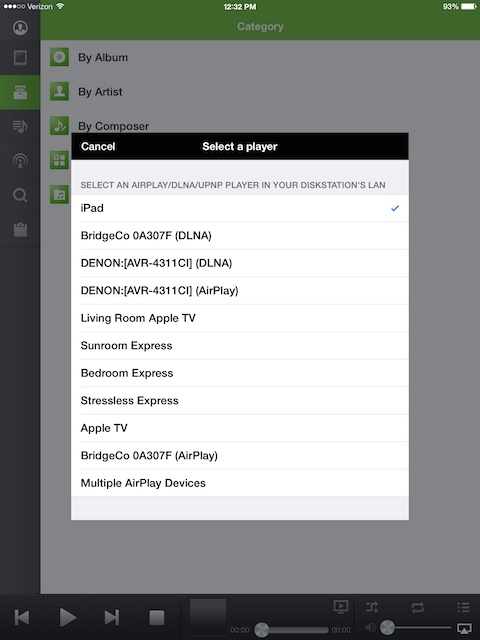
My favorite feature of the Audio Station is that it works with the iPhone and iPad using the DS Audio app.   With Airplay devices (like the Apple TV, Airport Express, and third party components with Airplay built in) it adds a feature that is not possible using the iTunes Remote app or even using a computer with iTunes built in.  The feature is the ability to send a different audio stream to multiply Airplay devices at the same time.
Picture
As you can see from the pic above, there is a "Multiple Airplay Devices" choice in the list.   Once it i chosen, you  then pic any of your Airplay devices and send it a stream from any album/playlist in you collection.  There may be some way to do this other than using Synology, but I am not aware of it.  

Also, notice that the iPad (which is what  I was using at the time) has an option to be the Airplay receiver.   For my use, this works much quicker than using the "shared" option built into the iOS music app.  I have a fairly large collection and iTunes has to load the library on my iOS device before it will play.

Once you have the DS Audio app loaded and you pick the place you want it to play, you have a few choices:
Picture
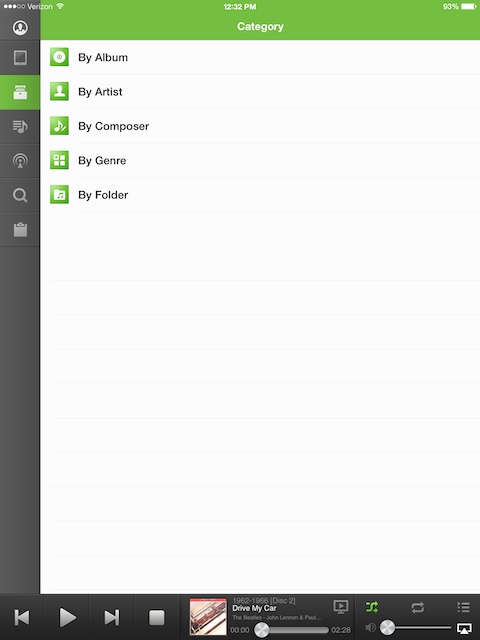
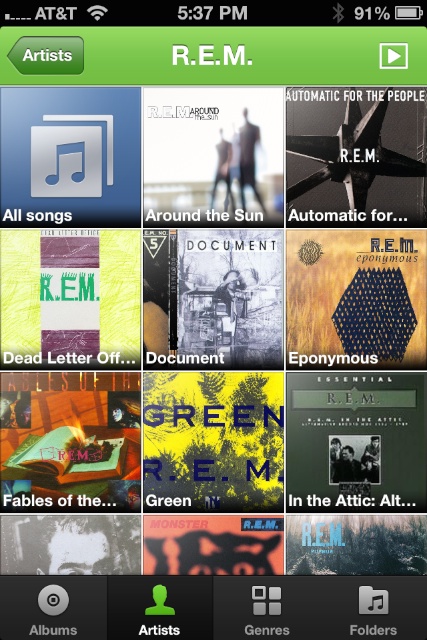
As you can see from the photo above, you can choose to play your own collection by  album, artist, composer, genre, or folder.  I usually choose artist or album.  For example, if you choose REM on my iPhone, you get a  screen that will let you pull up an individual album or their songs:
Picture
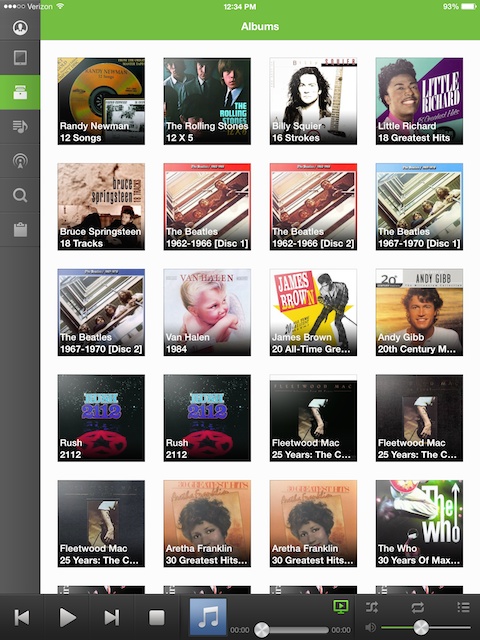
If you choose albums, you get a list of albums in alphabetical order (like the photo below from my iPad) and you can play any of them:
Picture
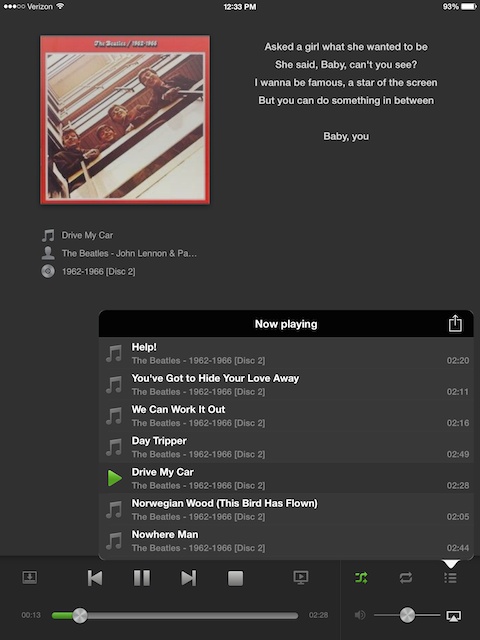
Once you chose an album and start playing a song, you get a screen similar to the photo below.  Notice that I also have lyrics setup to scroll while playing:
Picture
In the plc above from my iPad (the iPhone app is much more simple), notice that there is volume control built into the app.  This allows you to control the volume of the Airplay device.  Also notice the icon that looks like a play symbol inside a computer screen next to the square stop button.  This button will allow you to switch to another Airplay device if you have more than one going at a time.   A couple of buttons will take you back to the main library to add songs to the queue.  You can then delete songs you don't want to hear and/or save it to a playlist.

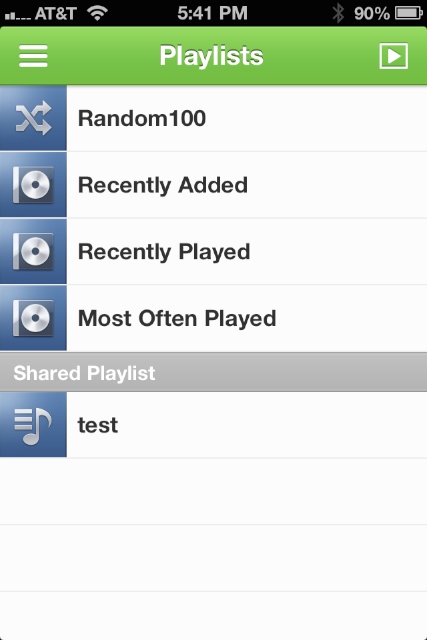
I don't typically use playlists, but I set up the "test" playlist below to make sure it would work.  Additionally, DS Audio sets up playlists for you:
Picture
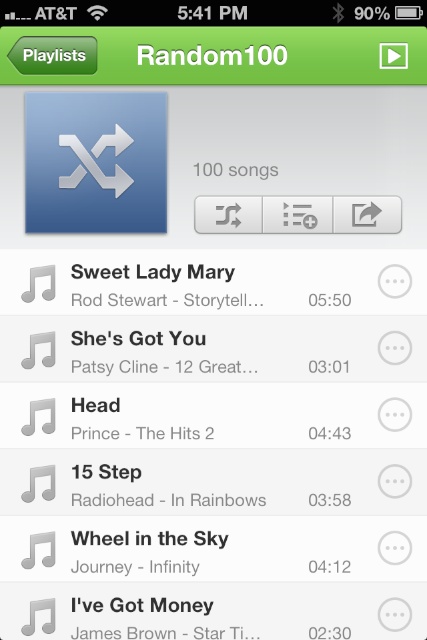
Below is an eclectic mix included in the "Random100" Playlist:
Picture
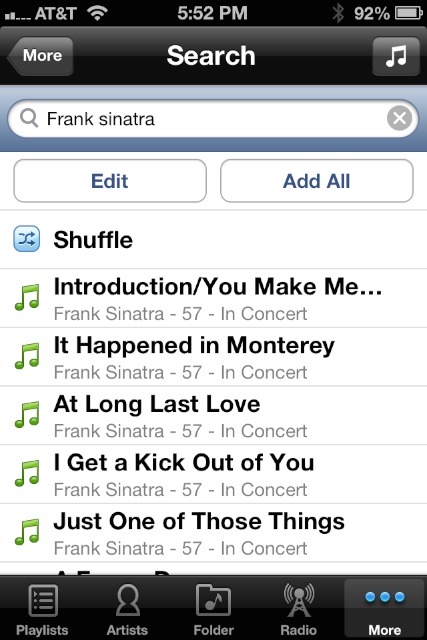
Another cool feature is the ability to search.  Below is a photo of the first page of results from my iPhone 4S after a search for  Frank Sinatra:
Picture
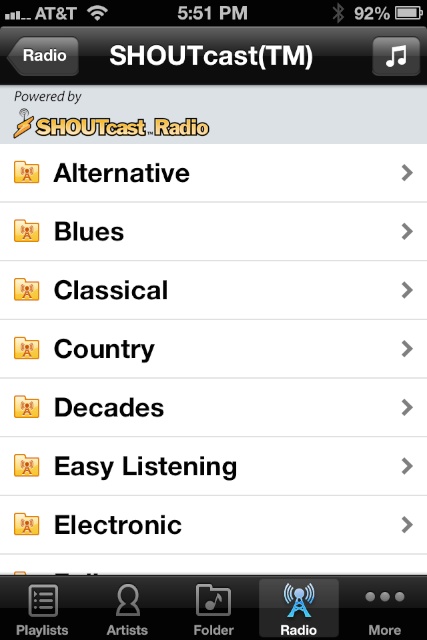
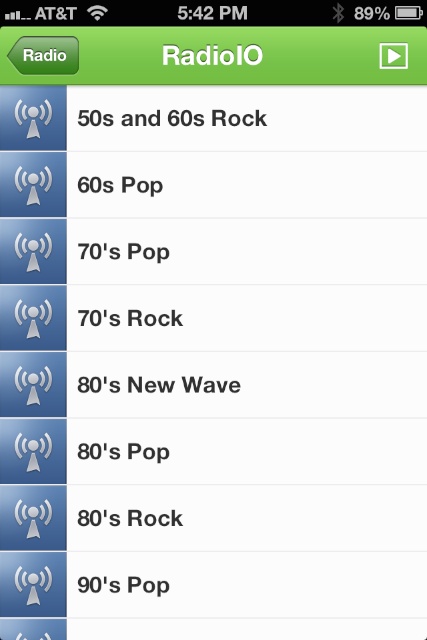
In addition to playing your own music, you can also play "Shoutcast", RadIO, "User Defined" and "My Favorite" radio stations.   You can setup your own channels in "My Favorite" or add stations from Shoutcast or RadIO, which come with a lot of stations already setup.

Below are a couple pics showing the first pages of the Shoutcast and RadIO setups:
Picture
Picture
While it is great being able to play music from this app at home, the Synology also allows you to set it up to play music from this app from anywhere.  I can be at work and play music to my iPhone or even start playing music in my living room from thousands of miles a way (not that I would want to).   

I should mention that there are more features, like playing directly from the USB output of the NAS, that I didn't cover.  However, as you can see, this app can be very useful to owners of iOS devices (I don't have an Android device, so I can't comment on how it works with those devices) and it gets used several times a week in my home or at work.   All in all, I am very happy with it.

2 Comments

Sonos vs Airplay

2/2/2014

7 Comments

 
Picture
NOTE:  Please make sure you also check out my newer 2010 Mac Mini vs Sonos Connect article.

Since Sonos new marketing blitz, I have seen a lot of questions related to how Sonos compares to Apple's Airplay.   For those that aren't aware, Sonos and Airplay have many similarities, but there a major differences between the two.

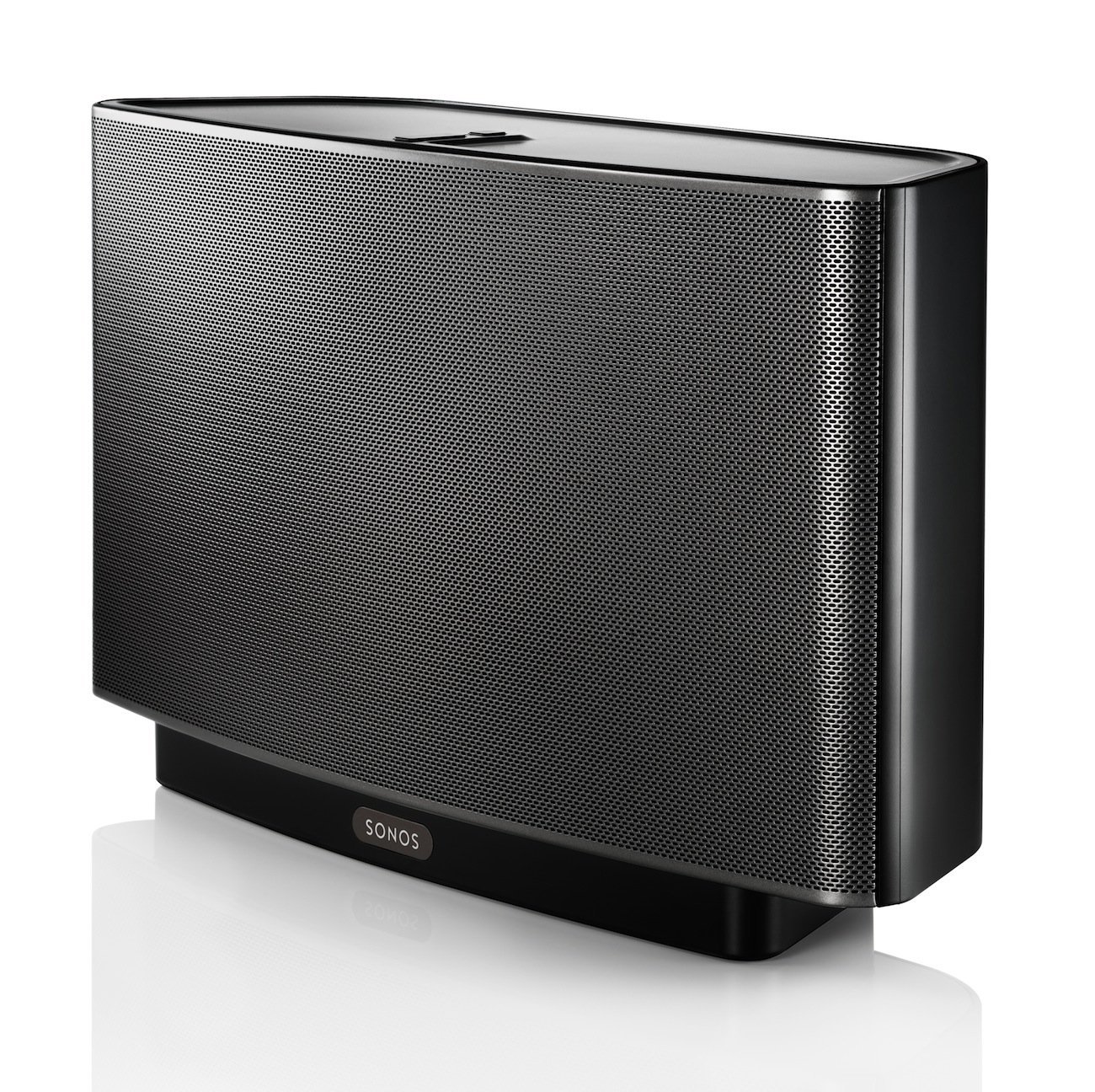
Sonos and Airplay are used for wireless/wired streaming  in many different devices.  For example, Sonos makes individual speakers, a sub, and a device that is simply for connecting to a separate DAC/receiver.   All of the Sonos devices are made by Sonos.  Airplay is a small part of the Apple ecosystem.   Apple makes the Apple TV and the Airport Express that both receive an Airplay signal.  They also license the use of Airplay to many different companies from inexpensive devices by Phillips to high end products by McIntosh.  

Below I am going to list several features of each of these wireless streaming services and how the other compares (NOTE:  Be aware that I strongly suggest buying either product from a vendor with a good return policy in case you have problems that you can't resolve):

1.  Airplay can be used for video, photos, and for mirroring a computer screen with the AppleTV.  

Sonos only works for audio.

2.   Sonos sets up a separate "mesh" wifi signal (in late 2014, Sonos added an update to allow you to also use your regular network)  that works outside of your main wifi setup.  This can be beneficial if your wifi is a problem.   

The Airport Express can bridge or expand your wifi network.  It connects directly to your current network.

3.  Sonos requires a $49 Bridge that connects to your router to setup a wifi network.  (Note: This is no longer required unless you are using their surround system or want to continue using their mesh network)

The Airplay devices connect directly to your current network via wifi or a direct connection via ethernet.

4.  Sonos has wireless individual speakers.  These speakers need to be plugged in and they start at $199.  

Airplay is available in individual speakers, too.  Since it is available in many different products, you can find speakers in the $75 range.  Unlike Sonos, many have batteries and can be portable.  When outside of wifi, some of them have Aux (the cheapest Sonos Speaker with Aux input costs $399) and USB inputs that make them more versatile for a portable setup.  The speakers with USB inputs can charge and play audio from devices like the iPad and iPhone. 


5.  Sonos has the ability to add another speaker and use them for stereo.

I am not aware of any Airplay speakers that have this ability.  You can buy Airplay systems like the Phillips DS9800W that comes with stereo speakers.  However, I would highly suggest getting an Airplay capable receiver and wired bookshelf speakers if you want to use Airplay in a stereo environment.  Unlike Sonos, most bookshelf speakers actually publish their specs.

6.  Sonos makes a Connect that will attach to your current system via analog or digital.  It costs, $349 + $49 for the Bridge (the bridge is no longer needed) if you connect it via Sonos wifi. 

Apple makes the Airport Express that connects to your current system via digital or analog.  It also works on wifi or by direct ethernet connection.  It costs less than $100.   I should mention that I can put an Airport Express in 4 systems for the same price as the Connect + Bridge.

7.  Sonos makes a wireless 5.1 system.  The sound bar is $699, the sub is $699, if you use Play1s for your surrounds, they are $199 each + the $49 for the Bridge.  

I am not aware of anyone making wireless 5.1 systems for Airplay (although there are so many Airplay devices that I could be wrong).   You should be able to put together a wired setup that is cheaper and sounds better for less money, though.  Also, there are devices available by Outlaw and others that will make any speakers wireless.  However, I have never used a wireless solution, so I am not sure how well they work.  

8.  Sonos has an app for Android and iOS.  These apps are designed to work with different services that have a Sonos plug in.

Airplay audio works with nearly every audio app on iOS.   For example, if you currently want to stream iTunes Radio, Tidal, Overcast,  JazzRadio, Downcast, or audio from most any other iOS app (including sending audio from video apps) to an Airport Express, you can do so with Airplay.   In other words, there are a lot more apps that work with Airplay using an iOS device. (Note:  Google play was added to Sonos after I initially wrote this article, so I decided to update this article.  It should be noted that Spotify is adding a Connect service and Apple bought Beats music, so it is possible that Sonos will no longer work with these services in the future.  It probably depends on whether these companies feel that it is cutting into their business.  Currently, Apple doesn't seem to care that much, but who knows what their plans are now that they have Beats?)

Android has several apps that appear to work with Airplay.   I don't own an Android device, so I can't comment on these services, but the AirAudio app professes to send Airplay audio from any Android app.  If it works as they say, it also has more versatility than Sonos.

9.  When using Sonos, most apps are streaming directly from the web despite being controlled by an iOS or Android device.  This means you can leave the area with the device while Spotify (for example) is playing and it will continue to play.

When you Airplay from an iOS/Android device with a third party app like Spotify, you are streaming directly from the device, so if you leave the area, you lose the signal.  Obviously, you can stream anything from a computer to iOS (directly with new Macs or indirectly using Airfoil from other computers), so, if you plan to leave and still want music to continue to play, you can do this directly from a computer.  My preference is using a Mac Mini (see my Sonos vs Mini article) as a media server.

10.  Sonos can send multiple streams to different Sonos devices from one app at the same time.

Airplay can't do this.  You would need multiple devices to send multiple streams.  While that is usually the case, I have a Synology NAS with Airplay built in that will send different streams from a music collection at the same time to separate Airplay devices.  (Note:  The WHAALE app has the ability to send multiple streams from iOS (soon to be an Android app, as well) with certain streaming sources.  See my article on WHAALE here).


11.  As I mentioned, there are many brands that have Airplay built in.  I own a Denon receiver with Airplay.   I can start Pandora, send an Airplay signal to my receiver, and the receiver will turn on and allow me to control the volume without a remote and without leaving the app.

Sonos is not built into receivers, so this is not possible.  They do make a Sonos Connect:amp that will allow you to connect speakers, but it does't compete in a home theater with a receiver and real speakers.  For one thing, there aren't any digital or video inputs.

12.   As I mentioned, Airplay can be used for audio with almost any app.  However, another major benefit by using it with an iOS device (Touch, iPhone, iPad) running iOS7 (or later) is the ability to control volume, skip or go back, and pause from the Control Center.  This means you can be in Safari, Twitter, Facebook, etc.. and still control these features without leaving the app you are in.  You can even control what is playing from the lock screen.

This is not possible with Sonos.

13.  With newer Macs, you can send ANY audio to an Airplay device.  There is also a $25 app called Airfoil (Mac & Windows) that will allow you to send audio from any program to any or all Airplay devices.  

Sonos has an app for computers that allows you to use only the apps with Sonos plug-ins.  

14.  Airfoil also includes something called Airplay Speakers that will allow a computer to be setup as an Airplay receiver.  This allows the computer to show up as an Airplay device and you can send audio to it.  This is beneficial if you use a computer in your main audio setup.  Airfoil Speakers is also available for Linux machines.  Airplay Speakers can also be used on a computer to receive a signal from an iPhone and then send that signal to multiple airplay devices.    

Sonos has nothing similar.

15.  Audiovarna +, Pure Music, and other audio enhancing programs work with Airplay.

Sonos uses its own software.

16.  The Sonos Connect is 2.91 x 5.35 x 5.51 inches (HWD).

The most current Airport Express is smaller in every dimension:  
0.9 x 3.85  x 3.85 inches.  The AppleTV is .9 x 3.9 x 3.9.  This small size makes it easier to fit into tight spaces and desktop systems.  Since Airplay is built into  many devices, you may not even need to take up any extra space.

One thing that should be mentioned is that most people will be happy with adding an Apple TV to their home theater and using it for music, video and photos.  However, it only sends out a 48khz signal, so most audiophiles will also want an Airport Express to play CD quality (16/44.1) bit perfect audio.   The good news is that the price of both together is less than one Connect.

Upside to Sonos:
1.  Complete Wireless Home Theater system
2.  Possible "mesh" wifi network (no longer a requirement )
3.  Ability to buy one speaker now and add a speaker later for stereo
4.  Send different audio signals to different Sonos devices simultaneously
5.  Direct streaming from the web with certain apps

Upside to Airplay:
1.  Better integration with iOS
2.  Works with a lot more apps 
3.  Built into many devices/receivers/speakers
4.  Airport Express can expand your wifi network
5.  A lot cheaper than Sonos 
6.  Better integration in computers (especially with Airfoil and Airfoil Speakers)
7.  Portability of certain battery operated speakers

It should be mentioned that most of the upsides of Sonos can be eliminated within the price differential of the two systems and be more useful in the long run.   For example, the wireless Sonos sub is $699 and only works with other Sonos speakers.  For $674, you could buy an Outlaw LFM-1 Plus/OAW3 Wireless Audio Combo.  This would be less expensive and work with any audio setup now and in the future, unlike the Sonos.   

If your wifi has tons of traffic, the Sonos mesh system might seem to make sense.  However, in most homes the Home Plug (power line ethernet) solution should be better and cost less money.  For example, for $59, you could add a TP_Link Gigabit adapter kit to get ethernet over your power lines (Typically, according to the linked FAQ, the line must be inside 5000 Square Feet).  The upside is that you would be able to connect it to a $99 Airport Express to extend your wifi network, which would benefit all of your wireless products that you use in that area of your home.  The new Home Plug solutions  work with up to 64 units, but the FAQ recommends 16 as the max.  

If you desire simultaneous streaming to different setups at the same time, for less than one Connect ($349), you could buy an iPod Touch for each setup for $224 and add an Airport Express ($95) device and still have money left over.  Personally, I think the need for different music playing in different setups being controlled by one iOS or Android device would be a very rare need.  It would be much more feasible that these separate setups would be for listening to music by different users.  Having a separate controller for each system seems like a much more practical way to manage separate devices.

Also, direct streaming from the web is similar to directly streaming from an iOS device.  If you are worried that your family will be listening to music in your living room from your iPhone via Airplay and you suddenly have to leave, which would cause the music to stop playing, the answer is to buy an iPod Touch that you leave at home.  This could be used as the main streaming device and you could leave with your iPhone without the music stopping.  As I mentioned, the cost of an iPod Touch is $224 (cheaper if you buy last year's model or a refurb) and the price of an Airport Express is $95 (can also find refurb or last generation versions for a lot less money.  I paid less than $60 from Amazon for a last gen version).  It is still cheaper than the Connect by itself or combined with a Bridge.  Personally, I would spend a few extra bucks and get an iPad mini 2 (now $249 for a refurb) for this type of setup, if I didn't already own an iPad.

The advantages of the numerous companies making Airplay devices can't be added to Sonos because it is a closed system.  The only hope is that more audio apps will be supported in Sonos in the future.   

For audiophiles, I think the Airplay devices offer more flexibility and a much more inexpensive way to accomplish similar tasks.  Neither of them currently offer hi rez streaming, so they are on par for sound quality (assuming you use the Connect with the same DAC/receiver).  When you start adding individual speakers, the Airplay speakers can offer more flexibility  because they are in a lot more devices.  If you want a speaker with a lot smaller footprint and battery powered portability, you can get a Phillips Fidelio  SoundRing.  If you want Airplay, but you also want hi rez streaming, you can buy a Pioneer A4 which has Airplay and DLNA built in.  If you want a receiver, but don't want a device hooked to it, you can buy components from Pioneer, Onkyo, Sony, Marantz, Denon, Yamaha, McIntosh, etc,  because they have models with Airplay built in.   

While most articles on this subject prefer Sonos, I really think it is no contest and an easy win for Airplay when it comes to most features, cost, and flexibility.   

NOTE:  If you are a Sonos user and I missed something, please let me know.  I am mainly working off of the information on Sonos' webpage, so it is possible that I missed a feature.

NOTE:  Please make sure you also check out my newer 2010 Mac Mini vs Sonos Connect article.


(edit - 3/22-14) I have had some comments and observations about this article.  I will paraphrase some of the points below:

1.  "Airport Express is more difficult to setup" - While I have never owned an Sonos device, I have setup 3 Airport Express (Update: I bought a 4th for less than $60) devices and they took less that ten minutes for the entire process...including launching Airport Utility on a computer (I only had Windows PCs when I got my first Airport Express and the process is even easier now) and setting it up to expand the network.  Since the Airport Express uses your regular wifi network, if your network has issues, there is a possibility that it could take longer to setup. 
*(important disclaimer below)

Some have said that Sonos is plug and play, but their support page shows that a lot of people have issues with the Sonos, too.  There is a post on Amazon with someone that has had Sonos for 4 years and it continually had to be reset and after several calls to Sonos the issue still hasn't been resolved.    As a result, I can't really say with certainly that Sonos has an advantage in this area.*(important disclaimer below)


2.  "Airport Express requires a double jump, so I have read that drop outs can be frequent" - It isn't a requirement, but for an app like Pandora, you usually send it to your iOS or Android device and then back to the Airplay receiving device.  However, I have seen very few drop outs in my setup.  I actually use Airplay quite a bit for Lynda.com videos.   Airplay can handle sending video from my network to my iPhone and back to my AppleTV without a problem, so it explains why  (in my setup) audio is handled without any issues.  Also, you can wire your Airport Express if you do have an issue.  I have a couple articles (article 1, article 2) on using ethernet power line adapters.  They work great and you can avoid ever using wifi for audio if you have a computer running an app like Rdio, Spotify, or iTunes.   Also, Spotify will add Spotify Connect to the desktop and become another wired only option (currently, you can use the "Remoteless app" for controlling Spotify on a desktop with an iPhone). 

* Note: I have since updated to the "TP-LINK Archer C5 AC1200 Dual Band Wireless AC Gigabit Router, 2.4GHz 300Mbps+5Ghz 867Mbps, 2 USB Ports, IPv6, Guest Network" which essentially doubled my speed across the network via the 5GHz band.  Luckily, the new Airport Express will support these bands.  The Sonos Connect is maxed out at 2.4Ghz so essentially, the double jump would result in the same speed range as a Sonos Connect).
*(important disclaimer below)

Sonos plays directly from the web, so you only need to worry about audio traveling one path.  The only possible benefit is that you don't need a computer in the mix.  However, I find that using a 2010 mini (see my  offers many more options for my overall needs (runs Plex, XBMC, iTunes, Security Cameras, etc..) and only uses 10 watts of idle power.  The Airport Express uses 2 watts of idle power.  A Sonos Playbar, just for comparison purposes, is 13 watts and bridge is 4 watts of idle power. 

*(important disclaimer below)

*DISCLAIMER
* I should mention that I can't say how either device will work in your home, so I have stayed away from this topic in my original article.  You can find  a lot of people that have had issues and success with both systems, so without real numbers, I can't say which is better.   My suggestion is that you buy these devices from vendors that have a good return policy in case you have issues.  

While I am on the subject of issues, I also want to mention that the Airport Express can have issues with dropouts between songs that clip off the beginning of songs with certain DACs.  I have used Airport Express units with 5 different DACs and I have never had an issue, so I am not sure how common the issue is.  As with the above, I would buy (at least the first one)  from a reliable source that has a good return policy.  With anything  tech, it is best to have some time with the product to determine if it will work with your environment.  

3.  The AppleTV has a feature that will allow you to send the audio to  any other Airplay receiver.  This is convenient if you have a headphone setup with an Airport Express near the area you watch AppleTV.  I have an Airport Express headphone setup next to my bed, so I can lay in bed and watch AppleTV without disturbing anyone.

Sonos doesn't have a similar feature.  

4.  Some have pointed out that it is convenient to have all of the apps built into one remote app like you have with Sonos.  This makes it easy to setup playlists and go in between several different services without needing to open several apps to do the same thing.

While this may be a benefit to some, you lose features from many different apps by going with the Sonos only app.   I am a subscriber to MOG (unfortunately, they go out of business in less than a month, but I am using this as an example) and their most unique feature compared to other music streaming services is the radio slider built into their app.  It allows you to start with the slider all the way to the left for shuffling music by one artist.  As you push the slider to the right, you add more similar artists.  You lose this feature by using a Sonos.  From what I have read, you also lose functionality for other apps like Spotify.  When it comes down to it, I would rather use the app designed by the music service since it is built to make the most of their service rather than using a "catch all" app designed by Sonos.   

The other benefit of using the app designed by the actual music steaming company is that you probably use that app when you are away from home via your cellphone.  I can listen to MOG in my car via bluetooth audio and walk in the house and flip up the Airplay controller and switch the audio to an Airplay device without leaving the app.  It works the other way around, too.  When I am listening to audio in the morning on Airplay devices,  I can leave the house and switch to bluetooth audio in my car without missing a beat.  Not possible with Sonos.

I will let people decide for themselves which approach they prefer, but I much prefer using apps that aren't crippled in exchange for integration between apps in a Sonos remote setup. 

5.  "My Sonos allows me to use a USB hard drive attached to my router without needing  a computer/NAS and it will catalog those songs into its system" - There are a lot limitations to the routers that this works with, so you may also need to add the price of a new supported router to the price of the Sonos system if you want to go this route.  

Airplay works with most apps in the iOS ecosystem.  While I use a NAS and/or a mac mini in my setups, I did a five minute search and found a $5.99 app called FileBrowser that works on iPhones/iPads (there are probably other apps that are similar, but this is the first one I ran across).  It will actually find any drive hanging off your network.   I have my music in folders arranged by artist/albums/songs and it is connected to an older Airport Extreme router.  It will allow you to open the folder with the songs and play the music and it works with Airplay.  It won't catalog the songs, so it is still limited in comparison to Sonos and an approved router, but it works fine if your goal is to play music.  I also want to mention that this app also works with supported video formats, so you can Airplay video to an AppleTV without using a computer.  I was surprised that it also works with DD5.1 soundtracks.

Rather than using the FileBrowser (although I recommend this app and plan to review it in the future), I would suggest loading your music up to Google Play (free for 20,000 songs), iTunes Match ($25 a year with a 25,000 song limit), or Amazon's service (that I have not tried).  The downside to these services is that they don't use lossless Codecs.  However, the Codecs are fine for most people if the popularity of the lossy Codecs used by iTunes, Amazon, Spotify and Pandora are any indication of what is acceptable to most people.   

The upside is that by allowing these services to scan your library,  you will get a cloud backup of your library in the formats that these services use (the last time I checked Google was using 320kbps mp3s and Apple was using 256k AAC files).  This will be an upgrade for some and a downgrade for those using lossless.  However, I think for the typical person the upside of having a cloud backup that is available anywhere via their cell phone outweighs the possible downside of using a 256k file.   I personally prefer listening to my own music at home in lossless, because I know nothing is missing, but I don't usually buy lossy music, so I know I am outlier.

The other upside is that iTunes Match is integrated right into the AppleTV's GUI and Siri on the iPhone/iPad (which means you can just tell Siri what you want it to play without even looking at a screen). If someone is using AppleTV, I would recommend iTunes Match.  For those using Chromecast, I would suggest using Google Play.  I have my music on both services because I tried Google's music service and loaded my files up to their service at the time.  While I didn't subscribe to Google Play, my music is still available in their app.

Since Sonos doesn't work with either of these services (Note:  They finally added Google Play after I wrote this article... nearly a year after it was available on everything else), I would call that a downside.  I would suspect that Google Play is integrated nicely into Android phones, but people will need to research that for themselves since I don't own any Android devices.

Another option is a hard drive that connects to your system via ethernet.  The Seagate Central that currently starts at $129 for a 2 terabyte drive.  It has an Android and iOS app that gives you remote access and the ability to stream audio via Airplay in lossless formats.  It also does the cataloging of your music.  I prefer a Synology NAS (that start at $149 for a one slot diskless platform) and their fantastic DS Audio app, but it can cost more.  However, I would prefer any of these to buying and setting up a new router.

6.  "I am ignorant of Airplay and I refuse to buy Apple products, but Sonos makes the best product on the market" - Ummmm...  Then  buy a Sonos!  It doesn't hurt my feelings.  I don't work for Apple.  These are just my observations after researching both products.   Sonos spends a lot of money on marketing their solution and Apple spends next to nothing on Airplay.  As a result, a typical consumer may have no idea that there is another, much cheaper, device that does very similar things (some better, some worse).   This article was to help those people understand the differences.  It isn't to convert Apple haters that want to stay ignorant about Airplay.

7. It has been brought to my attention that this article seems to be biased toward Airplay.  Well, Airplay simply does more (video/photos), is compatible with more devices (Denon, Sony, McIntosh, Phillips, etc..) and apps (currently Downcast, iTunes Match, iTunes Music, YouTube, etc..), and usually costs less.  

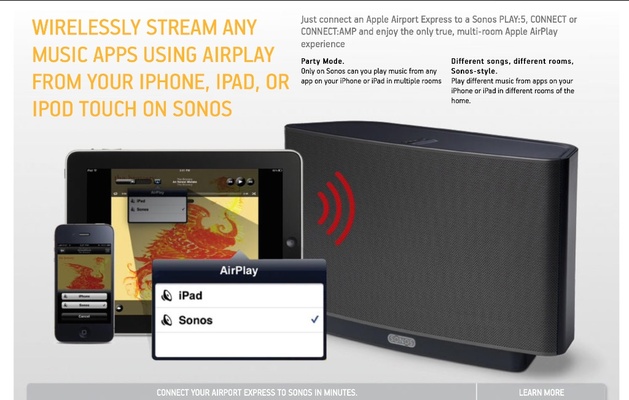
It is hard not to sound biased.  Even Sonos knows this or they wouldn't have a web page promoting the benefits of Airplay ( of course, you have to read the small print to realize that you need an Airport Express to make it work):

Picture


As I mentioned in the article, there are some upsides to Sonos.  It really just comes down to a cost/benefit analysis of whether those upsides justify the price and the loss of features available via Airplay.   Of course,  Sonos seems to think you should just buy both systems and then you get the upsides of both systems...  I would recommend this if you actually need those features and price is of no concern.
7 Comments

The Death of the Home Stereo System?

9/28/2013

2 Comments

 
Picture
This article is a response to the "Death of the Home Stereo System" article at CNN.com.  My plan is to take sections of the article and reply to them as a modern day music fanatic.

"All I had to bring was my laptop. That's pretty much what everyone had," says Rubio, who attended Emory University in Atlanta and now works for a local marketing and communications firm. "It was actually pretty good sound. It would get the job done."
"Get the job done"? That sounds like the white flag for an era that used to be measured in woofers and tweeters, watts per channel and the size of your record collection."

I doubt people took their record collections and watts per channel everywhere they went back in the so-called "golden age" of audio.   Now you can plug in a Dragonfly DAC and connect a pair of quality headphones and get fantastic sound quality anywhere you can carry a laptop (which is everywhere).  Your mobile choices in the past were much more limited.  If you were lucky, you had a mobile cassette player that did not compare to the sound quality from this type of setup.

"What's happened in the marketplace, the midmarket for audio has completely been obliterated," he says. "You have this high-end market that's getting smaller all the time, and then you've got the convenience market, which has taken over -- the MP3s, the Bluetooth devices, playing on laptops."

I don't believe that these devices are a compromise as much as they are answering an issue related to portability.  Also, most "mp3 players" now handle lossless formats.  For the audiophile, this is a better option for portability than wheeling around your components, speakers, and record collection in a wheelbarrow.

Also, I don't believe the midmarket for audio has been destroyed.  There are tons of DACs, amps, headphones, speakers, and receivers that aim at the midmarket.  In fact, I believe audio quality is improving at lower prices with each passing year.

As an example, I have a $30 T-amp that produces decent sound with a pair of efficient speakers.  You could not come close to the price (especially when you use present value formulas) for this sound quality in the past.  

The plus side to receivers is that the tech in the high end market of yesterday is now available in the lower  priced ( less than $1000 - not sure what is meant by midmarket) market today.   I have an extremely cheap Sony receiver (I think it was around $200 when I bought it) in my office that has audio pass through (this is needed if you are using a separate DAC) and can play anything you throw at it.  The same features a couple years ago would have been over $1000, easily.   Actually, it has features not available in $5000 receivers from 5 years ago....like the ability to play HD audio formats via HDMI instead of having 6 component audio connectors.

"Greg Milner, the author of the audio recording history "Perfecting Sound Forever," remembers the process. There were components. There were boxes of tapes and CDs. There might even be some vinyl.

It could be a pain, no question. The equipment was heavy. There were all those wires, plugs and jacks -- Line In, Line Out, Aux, Phono, CD, keeping track of the positive and negative strands of speaker wire. It was an effort just to break down and set up the stuff, never mind moving it."

Exactly, these things weren't made for portability.  CDs and vinyl are both still around and more people are buying vinyl than they have in years.  However, CDs are often bought and then ripped to a computer in a lossless format for the convenience of playing anywhere. 

"However, we also started focusing more on visuals. Penchansky traces the decline of the stereo system to the early '80s rise of the music video, which brought visuals to the fore. Suddenly, the concert hall in your living room -- or the audio imaging in your head -- was gone, replaced by surrealist pictures overwhelming the television's tiny speaker.

That branch of consumption has helped lead to the home theater.

Penchansky has nothing against HDTVs and 7.1 systems, but believes that, for the most part, it's a "sonic compromise." With a pure audio system, "There was no way that television, even today, simulates the realism of visual experience the way (good) audio can simulate an audio experience."


I agree that the video had a lot to do with the popularity of the home theater.  However, I think it had less to do with MTV than Dolby's Pro Logic combined with the VHS tape.  This allowed a more immersive experience for movie fans.   When DVDs hit the scene, the typical 3 channel setup expanded into 5.1 for Dolby Digital and DTS.  The flexibility of listening to a stereo soundtrack and a more movie theater like experience made people move the two channel setup out of their main living spaces.  The addition of a subwoofer also added much more oomph to the low end of the audio spectrum, especially when compare to the typical bookshelf speakers many people were using.

Personally, I don't believe this has to be a trade off.  I have a vintage two channel Marantz receiver and my Denon surround system blows it away for two channel music and obviously for movies.  The Audyssey calibration software built into many receivers addresses acoustical issues with less than optimal rooms.  To me, this was a significant step up in sound quality for all audio sources.  

The author seems to think this is a sonic compromise, but I don't agree with that assessment.   Listen to Dave Mathews and Tim Reynolds on Blu-ray in TrueHD audio and tell me that a video and audio experience combined don't measure up.  The flexibility of a multichannel setup also allows the user to take advantage of DVD-Audio and multichannel SACDs.  To me, a two channel only setup is more of a compromise.   You can't even listen to the great RCA Living Stereo or Mercury LIving Presence SACDs with the third audio track (which is how they were originally recorded) with a two channel only setup.

"Now, why even bother?" he asks. "If you can take your entire music collection and more in something that fits in your pocket, why would you not do that?"


The upside to using audio files isn't just pocket portability (although that is a major factor).  It is also about having your entire collection available from anywhere, including every room in your house or streaming it to your computer at work.  In the past, if you wanted to listen to a CD in your bedroom, you may have had to go out to your car to get the CD before being able to play it.  You may have it on a rack in the living room or in a CD player in another system.  Now you can pull the music from a server (computer, NAS, hard drive) and play it without needing the physical CD.  I have Airplay devices all over the house and it is great to be able to play a lossless version of any album I own from anywhere in the house or even stream the audio to every one of those units at the same time.

Finally, this may or may not be the so-called  "golden age of audio", but I do believe it is the golden age for the music fan.  Convenience leads to people listening to more music.  Services like MOG and Spotify allow subscribers to listen to millions of songs or thousands of albums.  Last night, I was watching Leno on the Tonight Show and he had Gregory Porter as the performer.  I had never heard of Mr. Porter, but I enjoyed his soulful performance.  This morning, I pulled up his new album on MOG (in a very acceptable 320kbps) and listened to it on my Denon 4311Ci setup.  It was great!  In the so-called golden age of audio, I probably would have never heard from him again.  It was too expensive to spend money on a full album that I might not enjoy and I would have forgot all about by the time I made it to the record store.  


When I was a kid, I remember going to library and checking out a couple of albums (I seem to remember a strict limit of a couple of albums at a time).  If I wanted to dig deeper into the John Coltrane album collection, I was out of luck because they only had a copy of "Blue Train".  With MOG, I can listen to every album (or at least most of them) in his collection.  I can also just push a button to take me to similar artists if I want to continue to explore.  

I do believe there is a disconnect between the music fan and the audiophile.  Many music fans can listen to music on AM radio and enjoy it.  It is about the music.  The audiophile often listens to their equipment and concentrates on the inadequacies.  I admittedly have more music fan in me than audiophile, but I have spent money on DACs, headphone amps, and other things to improve the sound over a standard set earbuds.   Unfortunately, I think being an audiophile often leads to discontent and the inability to just relax and enjoy the music.   This doesn't mean I don't strive for the best bang for the buck sound, but I don't  continually chase sound quality when I am fully aware of the law of diminishing returns. 

In short, I believe this is the golden age for music!


Picture
2 Comments

Why not feed the trolls?

9/16/2012

0 Comments

 
The article below (scroll down the page) was on one of my old blog sites and I recently tracked it down because of all of the new comments about the iPhone 5.

A thread was recently started on a forum I frequent that discussed Apple's new power cable for the new iPhone and the conversation, as per usual, became a troll haven for comments about Apple and all of Apple's products....once again leaving the subject at hand to learn about someone's personal irrational feelings.

Some of the new comments are similar to the old:

1.  Apple's customer service is a joke:  While one person's experience is their experience, you have to look at these things in total because some customers may be idiots that demand things that are irrational.  Articles from last year:

Apple tops in customer satisfaction for 8th year

Apple ranked highest in customer satisfaction among smartphone manufacturers

Given the surveys above, it shows that they still lead the industry in satisfaction for computers and smartphones.

2.  Apple has a the highest customer satisfaction rate in the industry  because their users don't know how to use a computer (this is the summary of one very long post):  Apple's users are like any other user base.  They want a product that works with little headaches.  The user base is made of people that are tech geeks (ever heard of jailbreaking?) and people that just want a reliable device for their basic needs.  There are similar people that use Windows and Android, but their customers are not as satisfied.  

3.  The iPhone lacks features of other phones:  The most quoted missing feature is Flash.  Personally, I am glad they didn't support it.  It forced websites to move to HTML5.  Here is an article on why this change is for the better.  That being said, Apple has allowed browsers in their app store that support Flash websites.  I have tested the Photon app on my iPad and it ran Flash.   Needless to say, I won't be needing it for Flash very often since most sites have an app or HTML5 available...thanks Apple! 

4.  The new iPhone 5 is not revolutionary, it is evolutionary:  Let's be honest, the last revolutionary hardware in the smartphone market was the original iPhone.  Just because Samsung apparently stole the blueprints and then made a bigger device, it doesn't make it revolutionary.  It is a tweak to what was already on the market.. a touchscreen interface with apps.  Given the size limitations that require the phone to fit in a pant pocket (for most people), it limits the ways you can fundamentally change the form factor.  I think back to The Office (television show) episode where they were using triangle phones.  This is a perfect example of a revolutionary change, if you don't mind the small inconvenience of 3 pointy ends and a holster that would hold such a device.  Not really for mass public consumption.

In addition to allowing for Flash in apps, Apple's ecosystem has gotten more sophisticated.  Siri, Photostream, iCloud, etc.. are all major changes to how I use my iPhone.  Here are a few examples:

a.  I want to set a Reminder:
 I simply pick up the phone, push a button and tell it the time and date I want to be reminded and I am all set.  It also works for alarms and calendar entries.

b.  I want to take photos on my iPhone and edit them on a Mac:  I simply take the photo and it automatically puts it in my Photostream.  When I sit down at my computer, it is already there waiting to be edited.  I also use this with an Eyefi card, so I am not limited to the iPhone's camera.

c.  I want to backup my very large music collection:  I subscribed to iTunes Match, so my ~23,000 song collection is now on the web in 256k format.  This is great (so great that Amazon has copied the feature) for backing up a collection in case of a catastrophe at home.  I know it is not lossless, like my home collection, but it is better than not having any of the collection I have built over the years.

d.  I want to access the music I backed up in iTunes Match:  I simply push a button on the iPhone and tell it to play an album.  It will then go out to the cloud, find the album and start playing.  This beats shuffling through my collection to find an album or artist.

e.  I want to play that music over my speakers:  If I am at home, I simply push the Airplay button on the iPhone and pick the Airplay device I want to use.  If I want to play it over my main system, it will turn on my Denon receiver and allow me to control volume from the Music app.  It works with most audio apps in my collection.

f.  I want to take a photo and see it on my AppleTV: Since AppleTV is hooked up to Photostream, my photos automatically show up.  It also works with iTunes Match for when my Mac Mini is off.

These are just a few of the important new features that make it hard to leave Apple.  With IOS6 around the corner, I am sure there will be more.

Read below for the old post I was referring to above

Why not feed the trolls?

My canned response related to Apple products that I own

Back in 2003, I bought my first iPod. It was the 2nd Gen version that had a firewire port and predated iTunes on the PC. It was one of the few models out at the time that had 20GB of storage space. Over the course of time, I have gathered a few more products (Shuffle, iPod Classic, iPod Touch, iPhone 3GS, Airport Express, and iPad, respectively). In my quest for more information related to gadgets and audio, I participate in a few online forums. What amazes me is that whenever I mention any Apple product, I get some ludicrous comments from one or more members. As a result, I am creating this blog entry to put in my signature link that can respond to these comments without derailing every thread in which an Apple product is mentioned into a debate about Apple.

Below are some of the most common comments and my reponse to them. If you want to add further comments, use the comment button, send me an email, or PM over your issue using the forum where you got this link, and I will try to answer the comments here:

1. You are an Apple Fanboy - this is by far the most common comment to any of my (or others) posts related to Apple devices. The comment is meant to imply that I only like Apple products because of some sort of blind loyalty to the company. This would make sense if I did not also own two portable players by Creative and own several computers running Windows.

2. Apple products are gimmicky – I think some people confuse ease of use and cutting edge devices as gimmicky. iPod hit the scene back in 2001. By 2007, over 100 million iPods had been sold. A gimmick is a “quirky feature that distinguishes a product or service without adding any obvious function or value”. Most people do not think of ease of use, apps for everything, 160GB hard drive space, etc.. as quirky features.

3. Faddish - A fad usually means that it is a product that is fashionable for a short period of time and then disappears. The iPod is not going anywhere. Also, I would argue that other players are much more faddish. An iPod is about as common as wearing socks. A SanDisk player (for example) is much more likely to be faddish because of their small market share and its flavor of the month status in some circles.
Edit: Woot had a deal on SanDisk Sansa Fuze and I bought one for comparison purposes. It was cheap, which is its main benefit and has decent EQ choices. Personally, I don’t think portable devices and EQ work that well together unless you live near a subway or have to take a bus and just want to mess with settings. I still prefer the iPod Touch because it is much better at a lot of stuff. Also, I don’t think it needs EQ out of the box like the Sansa. From what I understand, there are very good EQ apps available at the Apple app store, but I have not tried them.

4. Trying to look cool - Many have their own interpretations of “cool”. However, if owning an exceptional product is part of being cool, then I guess some buy them for the coolness factor. However, they are only cool because the product is viewed by the buyer as an exceptional device.

5. Trendy – How trendy can something be when 100 million+ devices have been sold? Once again, iPods have been around for 10 years. If they are still trendy, it is because of their exceptionalism when compared to the rest of the market. There is also news out that the iOS devices have now sold over 100 million, too.

6. Build Quality is suspect – I am sure every brand of electronic device has had an example of it being broken or just stopped working at some point. I still own a fully functional 2nd Gen iPod. So, from that perspective, I would say that this iPod is exceptionally well built. My 1st gen shuffle also works like it did the day I bought it.

Also, the fact that the popularity has not diminished seems to point to the fact that people are happy enough with the product to buy a new version of one. This is extremely common for iPhones and iPods. If people were miserable with the build quality, why would they buy the new version when it came out? There are many other options…many that appear to be copied directly from Apple. The fact is that the build quality is good enough for most people.

Sound quality sucks – I think that this is marketing hype put out by companies trying to get some market share. The fact is that sound quality is in the ear of the beholder. I would not argue if someone claimed that they prefer the sound of a Fisher Price record player to a VPI Scout. It is their opinion. The fact is some like tubes, some like solid state, some like analog, and some like digital. Its not an absolute. However, Apple makes some of the most flexible players if you want to improve on the small amps and DACs in a portable player.

There are many LODs (line out docks) that skip the internal amp to send the sound to a better portable amp (PA2V2 and Fiio E5 are two products I own). Also, if you want to spend the money, you can get a Pure, Wadia or Onkyo dock that will allow you to dig out the digital stream and send it to a better DAC (digital to analog converter). Most portable players have no way of doing this.

For the iPad, you can get the camera connector and send out a digital signal to a DAC via USB. Once again, this is not possible on most devices. While some people may appreciate Sony’s tweaked sound (for example), the fact is that most of their players do not even support compressed lossless formats (FLAC, WMA Lossless, etc..). As a result, the source file is lossy and I would argue garbage in/garbage out.

Edit (1/9/11) For the record, the iOS devices will now play FLAC if you want to download the FLACPlayer or one of the other apps in the Apple Store that make it possible. Personally, to me, lossless is lossless and I have no problems with ALAC.

Edit (1/9/11): Apple has made the USB a little more of a pain to use with unpowered devices. It now requires a T3hub (which tricks it) to work with my uDac. However, they added Airplay which gives it (and iPhones and the iPod Touch running the latest firmware) the ability to stream audio from the the iOS device to the AppleTV, Airport Express, certain receivers and speakers. I did an update for my Denon 4311CI receiver and I just tell the iPad to send the audio stream to my receiver and it will turn on the receiver and begin to play music. It also has volume control right on the iOS device. What other company makes devices with this type of flexibility? Also, best of all, this update from Apple was FREE!

(Edit) Apple is great at marketing – Yes, they have features the other guys don’t (or didn’t before they were copied), so it is easy to market them. Also, no one is saying Sony can’t market its mp3 players, but somehow they can market the PS3. Maybe marketing works better if you have a unique device that has features no one else has?

While the above are general comments that appear in any discussion of any Apple device, here are some popular comments related to specific products:

iPhone
The iPhone requires a jailbreak to be useful - OS4 should have put an end to this complaint. With it, you now have multitasking…which is the reason I jailbroke my 3GS. While many gadget fiends like myself will jailbreak, mod, and push a product past its basic commercial limits, it does not mean these products are useless before geeks get ahold of them.

There are better phones on the market - I don’t think there is a better phone for me. I like to have functionality across platforms. For instance, I download the Orb app to my iPhone. I then sync it to my computer. After that, I sync my iPad and iTouch to my computer and now I have Orb on all three devices. It is simplicity at its best. I also like the way the “Remote” app integrates with iTunes on my computer.

iPad

Here are a couple to address some concerns:
Its a big Touch – umm…yeah…that is why I wanted it. If someone wants to argue that a 3.5 inch screen is better than a 9.7 inch screen for anything visual, I would just have to say they are a liar. Fortunately for the iPad, the 9.7 inch screen makes it better for Netflix, Orb, ABC, USA Today, Pulse, Zinio, Pandora, etc.. The Touch is only more portable…but comes in handy when you need a pocket device and don’t own an iPhone.

A netbook does more – Who cares? My laptop does more than a netbook. My swiss army knife does more than my butcher knife. The question is what you use it for and how well it does those tasks. Have you tried chopping meat with a swiss army knife? Most people have netbooks for quickly getting on the net. They like them for their portability and battery power when compared to a laptop. However, it has a keyboard that takes up half the space. As a result, the iPad is easier to read on, carry from room to room, and it is faster to boot up. In other words, a netbook may do some things that iPad doesn’t, but I would use it much less… We own an MSI netbook and I would gladly trade it in for another iPad. At this point, I also use it A LOT more than my fairly new laptop. Form factor is everything!

iPod Classic 160GB – I rarely post about this product, but I have a good reason for selecting it instead of Cowon (which I also like). My car has a plug in that works with iPods. It allows the user to control what is playing (via genre, playlist, album, artist) using the head unit or the steering wheel controls. There is not another brand that will work with it, so it is what it is. However, the fact that so many accessories (I also have a Sendstation pocket dock for attaching my iPhone to my car’s USB input) are made specifically for Apple devices makes them more user friendly than other devices. I should also mention that I wanted 160GB, so I could use lossless files.

Ipod Touch – I got one of these while I was locked into using a Treo on Sprint. The apps and the wifi capabilities are incredible. While I rarely use it since I got an iPhone, it is what got me interested in apps and the iPhone. It also has an LOD output that allows it to be used with outboard amps. The new version also works with airplay.

Airport Express – Inexpensive music server. Unlike the Roku Soundbridge I also own, it does not take up any desktop space. It can be controlled using the Remote app. Edit (1/9/11) It also supports Airplay which means I can fire up audio on my iPad and it will play it back on this device.

While I am not saying that Apple devices are perfect, AT&T for the iPhone in the USA is an issue (Edit..obviously, Verizon now has the iPhone, too), I am saying that making a bunch of ignorant comments about them anytime they are mentioned serves no purpose…other than derailing threads to a point that the original post is no longer being considered. Admit it, Apple makes some decent products.

(Since I lost all of my old articles, thanks to moving to a new host, I am reposting some of my old articles…Thanks to Google for the ability to get the old articles from their cache.)
0 Comments

Amazon Prime Video - iPad

8/5/2012

0 Comments

 
Amazon Prime has finally made its way to the iPad!!  Yay!  While I do have Amazon Prime video on the Roku in the living room, I was excited about being able to Airplay Amazon Prime in my bedroom which is equipped with a second generation AppleTV.

Unfortunately, Amazon decided to not only disable standard Airplay, but it also went the extra mile and killed off Airplay Mirroring (usually the best way to get video from an App without an Airplay video option).

Nice to see Amazon finally coming to the iPad, but I am not excited that they decided to cripple it.  I guess they want us to buy a Roku box?  I would rather bring my Mountain Lion equipped laptop into the bedroom and mirror Amazon Prime from there, since (right now) it works without a problem.


0 Comments

New iPad 3 Review

3/17/2012

0 Comments

 
Picture
The new iPad has hit the streets and I updated from my Original iPad.  Since everyone is posting their reviews, I figured that I would also give my opinion on the subject.

First, let me start by discussing the way I typically use the iPad.  I check email, listen to music, surf the web, look at photos, read books, magazines, news, and blog apps.  I also watch the occasional video, check Twitter and Facebook, and check my calendar.  The list grows as new apps appear.

Now here is my list of favorite new features (coming from the Original iPad):

1.  The gorgeous screen - I have read a few reviews saying that there isn't much difference between the old and new iPad and I have to wonder if these people are just trying to get attention or whether they need an eye test.  The screen is better for EVERYTHING!  Do you use the iPad to read text? Email, Safari, Twitter, etc?  There is a noticeable difference if all you do is read text.  Do you use Photo Stream from Apple?  Photos look better and editing is made easier with apps like iPhoto that are now available. It is also able to handle 1080p video rather than 720p.  

2.  Faster - I decided to launch Google Earth on the Original iPad and the new iPad.  The speed of loading the app was not even close.  It is A LOT faster than the Original iPad.

3.  Cameras - While some are complaining about the front facing camera on the new iPad, some of us coming from the Original iPad are happy to have any camera, much less two.  

The back camera is a 5 megapixel camera that is used for taking pictures or recording video.  I have seen articles asking why anyone would want to take a picture with an iPad.  It does seem kind of humorous, but keep in mind that the best camera is the one you have with you. In other words, if you are reading email on an iPad and something interesting happens, you can just fire off a picture or record a high def 1080p video without laying down the iPad and grabbing another camera.  Moments in time don't often come back, so having something at the ready, in your hands, is a huge plus.  

The front facing camera is a "VGA quality camera".  For those confused by the description, it means that the front facing camera is not very good.  Personally, I rarely use FaceTime and have never used Skype, so I could care less.  However, I bet we will see a bump in quality with the next iPad.  In any event, the Original iPad does not have any cameras, so even this one camera is better than nothing.

4.  Airplay Mirroring - This is not available on the Original iPad (NOTE: I am not referring to jailbroken iPads in this article).  This is an amazing creation that will send whatever is showing or playing on your iPad wirelessly to an AppleTV that is hooked up to your entertainment system.

5.  4G/LTE - For $130 more than the wireless only iPad, you can now get 4G/LTE from Verizon or AT&T in the USA.  If you buy this option, you will then need to buy a cellular data plan that you can cancel and/or change at anytime. 

I bought a Verizon model.  It was a pretty easy choice.  They have more coverage than AT&T including the area I live in.  They also offer a hotspot with their plans.  I have an iPhone with a (3G) hotspot feature on AT&T already.  With two services, I should have cellular coverage in more areas.  

I decided to go ahead and activate the service since I will be out of town a few days in the next month.  I tried it out and it was very speedy.  I did not run a speed test because I did not want to waste data.  However, it was similar to my wireless setup at home.

6.  Size - While some have complained that it is thicker and weighs more* than the iPad 2, it should be mentioned that it weighs less and is thinner than the Original iPad.  I should also mention that I never had a problem with the 1.5 pound Original iPad.  I am always surprised when I read grown men whining about the weight when my mother and my teenage niece have no problem with their Original iPads.  

* The new iPad is .03 inches thicker and .11 pounds heavier than iPad2.  Yes, grown men are complaining about this!

7.  Battery - the battery life is about the same.  However, the new iPad gets a little warmer.  I have mine in a cheap pleather case (until we have more choices on the market) and I did not notice any heat until I pulled the iPad out of the case. Therefore, if you keep yours naked, you may notice it.  

8.  Hard drive space - The new iPad has the same GB sizes and prices as the past generations.  Some are worried about the new display being a data hog, but I am not too worried.  I use Zinio for most magazines subscriptions and you can delete old magazines if you need to.  Amazon books has the same feature. They are available to restore at a later time if you choose to do so.  

With iTunes Match, I now keep less music on my iOS devices.  For $25 a year, they "match" your music and make a 256kbps AAC DRM free file available on their servers.  I have over 20,000 music files ripped from CDs and this makes everything available all the time.  When you play the file, it will automatically download it to the iPad.  You can then delete it later if you need the space.

I also subscribe to MOG and Jazzradio which fills most of my other music needs.  MOG will store a local copy or just stream music from their server.  

Photos - with Photo Stream, you can now store 1000 of your most recent photos in the cloud.  Photos you take with your iPhone or iPad will appear in your Photo Stream.  Also, photos you take with another camera can be saved to the iPad using the camera connection kit and those photos will also be saved to your iCloud based Photo Stream.  If you have a Mac, you can have it store those photos locally.  This eliminates a need for having tons of photos on your iPad all the time.

Video - I will use most of my space for apps and video.  The new iPad can store 1080p, but nothing says you have to use the highest uncompressed bitrate for all your files.

If you have to have massive hard drive space on the go, you can get a terabyte "HyperDrive" for $399 (it is also available with less space for less money). It connects to the camera connector kit and your iPad.

9.  Voice "Dictation" - No Siri for the new iPad.  I am not surprised since people are claiming to have issues with Siri (which is still in beta) in large cities.  If the servers are crashing with the current traffic, I would imagine that Apple doesn't want to make the situation worse.  The good part is that they added Dictation which works with Apple's apps and third party apps.  It allows you just to say what you want to write.  

I would not be surprised to see Siri added as a software at some point in the future once they get the kinks out, but I am not guaranteeing it.

Finally, I am one of the many people that do not update Apple products every year.  When I bought the Original iPad, the only thing I wanted was a better display.  They added it and many other things to make it a worthwhile upgrade. Personally, if I bought an iPad2 last year, I would sell it and buy the new iPad.  The display is a huge part of the overall experience, so having 4x more pixels is a huge improvement. Of course, people have to decide what is best for their wants/needs, but hopefully this blog will give them the information to help make that choice.


0 Comments

What is Airplay?

2/25/2012

0 Comments

 
I have a few posts that mention Apple's Airplay, but I have not really explained exactly what Airplay does.  Since I see a lot of hits on this site that seem to be searching for this information, I have an explanation how it works in my system below:  
Picture
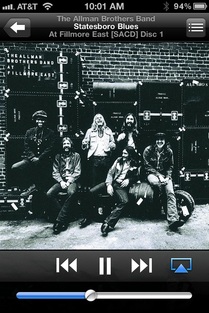
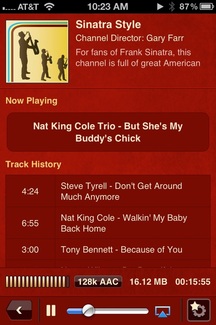
Airplay has a lot of uses. One of the main uses is that you can have iTunes running on a computer and use certain versions of the iPhone, iPad or iPod Touch to remotely control what is playing and where the audio signal is being sent.  In the picture above, I am using the Apple Remote App on my iPhone 4S to control iTunes that is running on a Mac Mini in a separate room.  If you notice, there is an icon near the bottom right side of the screen that looks like and arrow up inside a box.  When you press this button, you get something similar to the box below:
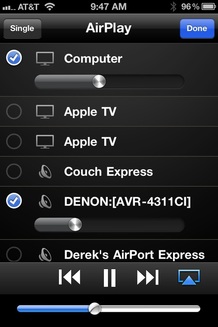
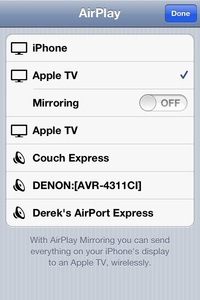
Picture
As you can see, there is a list that contains the computer running iTunes and several other devices are listed.  The other devices are components that can accept an Airplay audio signal.  As you can see, I have two Apple TVs (it is possible to rename them, but I only have two of them, so I have not done it).  Also, I have a couple of Airport Express units that I call "Couch Express" and "Derek's Airport Express".  An Airport Express can be used to expand a network or to except an audio signal.  Since it has a digital output and analog audio output, it can be used with pretty much any radio or receiver with an audio input.  I use the digital optical output to feed a DAC (digital to analog converter..most new receivers have DACs built in) which then feeds an amp an analog signal. The sound quality is fantastic if you go this route. 

I should note that some DACs have issues with reclocking the signal between songs, which could cause it to lose the first second of each song.  So, it would be worth doing some research on the subject before you pick out a DAC or before you buy an Airport Express to use with a DAC you already own.  I have no issues with the 3 DACs I own, so I am not sure how many DACs have this issue.

As you can see in the picture above, the Remote App will also allow the user to control the volume on each device which is nice if you have a radio or amp without a remote to control the volume and you don't sit nearby.

Picture
While I do love to play my own music via iTunes, my favorite feature of Airplay is that it frees most of the audio apps that you have on your iOS device.  As you can see above, I am running the Sinatra Style channel (via the Jazzradio app) on an iPhone.  In the bottom right corner, you notice that it has the Airplay icon that allows the user to send the audio to Airplay devices that are on the same wifi network.  It also works with the MOG (my favorite music source) app and SiriusXM's app if you have a subscription.
Picture
While I mainly use Airplay for music, it is also great for displaying pictures from your iOS device on your TV.  As you see from the pic above, the Airplay icon shows up in the bottom of the screen of my iPhone when I choose a photo from the Photos App.  If you press it, it will show only the devices on your network that can display photos.  In my case, it shows the AppleTVs on my network.  When I select AppleTV, the picture will show up on a TV that is connected to my Apple TV2.  Notice that there is also a play button on the bottom of the screen.  This will allow you to start a slideshow and select music if you want a song to play while you watch. If you have video you recorded on your iOS device, it will send the audio and video over the network to your Apple TV2, as well.
Picture
Occasionally, you will run across an app that does not have Airplay enabled.  For example, you might want to play Angry Birds on your big screen.  Well, iPhone 4S and iPad 2 have "Airplay Mirroring" built in for that reason.  Airplay Mirroring will show whatever you have displayed on your iPhone 4S/iPad 2 on the Apple TV2.  This makes it possible to play Angry Birds using the iPhone as a controller while looking at the TV.  It also comes in handy with apps like Slingbox that do not have Airplay for video built in or the McIntosh Audio app that does not even work with Audio Airplay.  The main downside to mirroring with the iPhone is that it comes across in iPhone format, so it will not fill up a 16:9 screen. 

While this article is not all inclusive, I hope it helps you better understand how to use Airplay in your network. For me, it is a tool I use daily for music and occasionally for video. However, please be aware that some older iOS devices can't be updated to work with Airplay, so you may want to research a little more if you decide to pick up an older iOS device for this purpose.
0 Comments
Forward>>

    About me:

    Dog loving, Big Green Egg worshiping, Tech enthusiast, residing in Memphis, TN.  Home of the Tigers, Grizzlies, Elvis, Al Green, Stax, Hi Records, Ardent Studios, Beale Street, Peabody Ducks, etc..  I have also added the Jeep Wrangler to the list of things I am enthusiastic about.

    Archives

    January 2025
    December 2024
    November 2024
    October 2024
    September 2024
    August 2024
    July 2024
    June 2024
    May 2024
    April 2024
    March 2024
    January 2024
    December 2023
    November 2023
    July 2023
    March 2023
    February 2023
    January 2023
    November 2022
    October 2022
    September 2022
    July 2022
    March 2022
    February 2022
    November 2021
    October 2021
    September 2021
    July 2021
    May 2021
    December 2020
    October 2020
    August 2020
    July 2020
    June 2020
    May 2020
    April 2020
    February 2020
    January 2020
    December 2019
    November 2019
    October 2019
    September 2019
    August 2019
    June 2019
    November 2018
    October 2018
    September 2018
    July 2018
    March 2018
    February 2018
    January 2018
    December 2017
    November 2017
    October 2017
    September 2017
    August 2017
    June 2017
    May 2017
    April 2017
    February 2017
    January 2017
    December 2016
    November 2016
    October 2016
    September 2016
    August 2016
    July 2016
    June 2016
    May 2016
    April 2016
    March 2016
    February 2016
    January 2016
    December 2015
    November 2015
    October 2015
    September 2015
    August 2015
    July 2015
    June 2015
    May 2015
    April 2015
    March 2015
    February 2015
    January 2015
    December 2014
    November 2014
    October 2014
    September 2014
    August 2014
    July 2014
    June 2014
    May 2014
    April 2014
    March 2014
    February 2014
    January 2014
    December 2013
    November 2013
    October 2013
    September 2013
    August 2013
    July 2013
    June 2013
    May 2013
    April 2013
    March 2013
    February 2013
    January 2013
    December 2012
    November 2012
    September 2012
    August 2012
    July 2012
    June 2012
    May 2012
    April 2012
    March 2012
    February 2012
    January 2012
    December 2011
    November 2011
    October 2011
    September 2011
    August 2011

    RSS Feed

    Categories

    All
    135i Convertible
    16GB RAM MBP
    1 Series
    2010 Mac Mini For Media
    2011 MBP Dock
    2016 MBP
    2016 Office Tour
    2018 Mac
    2024 IPad
    328i Convertible
    3gs
    3rd Generation Ipad
    3rd Gen Ipad
    3 Series
    413j
    4K Dock
    4k FireTV
    4k Media Streaming
    4k TV
    4s
    5d Mark Iii
    5d Mark Iii Vs Nikon D800
    5d Mkiii
    5 Inch Iphone
    7 Cities Album Review
    85mm Review For Sony
    Air Display
    Airfoil
    Airfoil Speakers
    Airfoil With Echo
    Airfol
    AirMusic Player
    Airplay
    Airplay 2
    Airplay Mirroring
    Airplay Watch
    Airpods
    Airport Express
    Airport Express Airplay
    Alexa
    Alienware M15 R4
    Amazon
    Amazon Echo Dot
    Amazon Echo Dot Review
    Amazon Music
    Amazon Prime
    Angels Horn
    Angels Horn Review
    Anova Bluetooth Review
    Anova Precision Cooker
    Anova Suos Vide
    App
    Appel Watch
    Apple
    Apple And Sonos
    Apple Cinema Display
    Apple Has Awful Customer Service
    Apple Headphone Jack
    Apple HomePod
    Apple Is Doomed
    Apple LIghtning To USB Adapter
    Apple Lossless
    Apple Mac
    Apple Music
    Apple-music
    Apple-music-app-of-the-year
    Apple Music Beta IOS 10
    Apple Music Beta On IPad
    Apple Music Lossless
    Apple Music Mastered For ITunes
    Apple Music - Mastered For ITunes
    Apple Music Mastered For ITunes
    Apple Music Matching
    Apple Music Preview IOS10
    Apple Music Review
    Apple Music Siri
    Apple Music Suggestions
    Apple Music Watch
    Apple Music Wishlist
    Apple's Customer Service Is A Joke
    Apple Spartan
    AppleTV
    Apple Tv2 Airplay
    Apple TV 3rd Gen
    Appletv 4
    AppleTV 4 And Airplay 2
    AppleTV 4th Gen Review
    AppleTV 4 Wishlist
    AppleTV Wishlist
    Apple Watch
    Apple Watch 1 Year
    Apple Watch Apps
    Apple Watch As Remote
    Apple Watch December 2015
    Apple Watch Review
    Apple Watch Ultra
    Apple Watch Ultra - Tech Of The Yeart
    Apple Watch Vs Mechanical Watch
    Apple Watch With Airplay
    Apple Wishlist
    Apple Wishlist 2016
    Apps
    Arlo Q Review
    Arlo Wireless Review
    Audio
    Audiophile Reviews
    Audioquest Dragonfly Review
    Audiotap App
    Audirvana
    Audyssey
    Backups
    Backyard Cooking
    Bakersfield Review
    Battery Power
    BBQ
    BBQ Guru DigiQ Review
    Beats Music
    Beats Music IOS
    Beats Music Review
    Best Cloud Services
    Best IOS Apps 2015
    Best IPad Apps (2015)
    Best IPad Case
    Best IPhone Apps Of The Year
    Best Office Setup
    Best Sounding Bluetooth
    Best Stuff 2024
    Best Tech
    Best Tech 2021
    Best Tech 2022
    Best Web Services
    BFG KO2
    Bge
    Bge Table
    Big Green Egg
    Birsket On The BGE
    Black Rapid
    Bluetooth
    Bluetooth Headphones
    Bluetooth Keyboard
    Bluettooth Headphones
    Bmw
    Bmw Apps
    Bourbon Decanter
    Brisket
    Brisket On The Big Green Egg
    Brisket Pizza
    Cablecard
    Camptune
    Canon
    Canon F4 Zooms
    Canon Selphy Review
    Canon Wishlist 2016
    Canon Zooms
    Cars
    Case With Bluetooth Keyboard For IPad
    Case With Keyboard For IPad Air 2
    Ceramic Grill Store
    Charge IPad While Using DAC
    Cheap HiRES
    Checklist For Sous Vide
    Christmas Ideas 2021
    Chromecast Audio
    Chromecast Vs Airplay
    ClipR
    Clockology
    Cluttered Home Office
    Coach Pastner
    Consumer Reports
    Convertible Laptop
    Cool Tools - A Catalog Of Possibilities Review
    Cool Tools Book Review
    Crashplan+ Family Plan
    Crashplan Review
    Crashplan+ Review
    Crashplan Seed Review
    Crazy Room Setup Video
    Cuisinart
    Cuisinart ICE-21 Review
    DAC
    Denon
    Denon 4311CI
    Design Trends That Aren't Practical
    Desk Tour
    Desk Update
    DigiQ For BGE
    Directv Genie
    DLNA
    Dog Anxiety
    Dog Gadget
    Dog Tech
    Dog Thunderstorm Solutions
    Dragonfly DAC
    Dragonfly DAC With IPhone 6 Plus
    Dragonfly Usb Dac
    Dragon Glasses
    Drone
    Ds413j
    Earbuds
    Echo Dot For Music
    El Capitan Install Problem
    Elegant Designs
    Elgato Dock Review
    Elgato Thunderbolt 2 Dock Review
    Elliptical
    E Pl5
    E-pl5
    Epson 2040 Review
    Ergotron MX Mount
    Esr Case
    Extending Wifi
    F4 Preference
    Ff Vs M43
    Fidelia
    Fix El Capitan Install Issue
    Folding Keyboard
    Full Frame Vs Miro Four Thirds
    Gadget Backpack
    Gaming Projector
    George Foreman Grill
    Gift Ideas
    Gps App
    Grill
    Grilling
    Grilling Out With A Griddle
    Hadley
    Harken Hoister
    Hdmi To Ethernet
    Headlamp
    Headphones
    Headphone Stand
    Headphone Stand Review
    Heed CanAmp
    Hi Rez Music Overrated
    Hi Rez Vs Redbook Audio
    Home Design Ideas
    Home Office
    Home-plug-and-airplay
    Homepod
    Homepod-compared
    Homepod-review
    Homepod-review
    Homepod-with-echo
    Homepod-with-j-river
    Homepod-with-plex
    Home-surveillance
    Home Theater
    Hot
    Hot85a534125d
    How I Use The 2024 IPad
    How-to-use-that-old-iphone
    Hp-4k-display-review
    Hp-spectre-32inch-studio-display-ledlit-monitor-review
    Hue-lights
    Huge-bluetooth-speaker
    ICatcher App
    Imac
    Imac-ssd-thunderbolt-upgrade
    Imac-ssd-thunderbolt-upgrade
    Imac-thunderbolt-2-dock-review
    Imac-with-second-monitor
    In Defense Of Tim Tebow
    Inexpensive Home Theater
    Inexpensive-home-theater
    Intuos 4
    Ios
    Ios-10
    Ios-lightroom
    Ios-multiple-room-airplay
    Iososx-hybrid
    Ios-remote
    IPad
    Ipad2
    Ipad 3
    Ipad Accessory
    IPad Air
    IPad Air 2
    IPad Air 2
    Ipad-air-2
    Ipad-air-2-audio
    Ipad-air-2-vs-ipad-3
    Ipad-apps
    Ipad Battery
    Ipad-battery-pack
    Ipad Battery Running Slingbox
    Ipad-bluetooth-keyboard
    IPad Case
    Ipad-case
    Ipad Consumer Reports
    IPad Desktop
    Ipad Doesn
    Ipad Hot
    Ipad-kelbyone
    Ipad Killer
    Ipad-lightroom-app
    Ipad-lyndacom
    IPad M1
    IPad M4
    IPad M4 13
    IPad M4 Review
    Ipad Mini
    IPadOS
    Ipad-photography
    Ipad-pro-97
    Ipad-pro-97-review
    Ipad-pro-97-vs-ipad-air-2
    IPad Rather Than
    IPad Replace
    Ipads Fatal Flaw9e14764628
    IPad Vs Mac
    Ipad Warm
    Iphone
    IPhone 14 Pro Max
    Iphone 4s
    Iphone 5
    Iphone-6-plus
    Iphone-6-plus
    Iphone-6-plus-case
    Iphone-6-plus-inexpensive-case
    Iphone-6-plus-in-hand
    Iphone-6-plus-review
    Iphone-6splus-best-accessorires
    Iphone-7-plus
    Iphone-7-plus-jet-black
    Iphone-7-plus-review
    Iphone-accessories
    Iphone Airplay
    Iphone-apps
    Iphone-apps-2015
    Iphone-battery-pack
    Iphone Case
    Iphone-headphone-jack
    IPhone X
    Ipod
    Is Apple Music Perfect?
    Is Hi Rez Worth It?
    ITunes
    ITunes Lossless
    Jazz - Mastered For ITunes
    Jazzradio Airplay
    Jeep
    Jeep Accessories
    Jeep Cabin Curtain
    Jeep Cargo Cover
    Jeep Wrangler Accesories
    JKU SeatCovers
    JKU Seat Covers
    JKU Updates
    J River Airplay
    J River With Echo
    Karu
    Kelbyone Review
    Kettle-Q Review
    Kindle
    Kindle Fire
    KitchenAide Mixer
    Kohler Mirror
    Kurt Kinetic
    Lacie Drive
    Lending Service
    Lexi
    Lexi IOS App
    Lifeproof
    Lifeproof Case For Ipad
    Lifeproof Case For Ipad Review
    Lifeproof Case Review
    Lifeproof IPhone 4s
    Lightroom
    Lightroom Mobile
    Liquid Spirit Album Review
    Living Room
    Living Room Projector
    Lodge Cast Iron
    Lossless Audio
    Loudness Wars
    Lynda.com Review
    Lynda.com Vs Kelbyone
    M43
    M4 Accessory
    M4 Ipad
    Mac
    Mac Apps
    Macbook Pro
    Mac Mini
    Mac Mini Home Theater
    Mac Mini Living Room
    Mac Mini M1
    Mac Mini Media Maven
    Mac Mini Media Server
    Mac Mini Remote
    MacOS
    Magic Keyboard
    Make Any Headphones Wireless
    Marantz 2220b
    Mastered-for-itunes
    Maverick Et732
    Mbp
    Mbp Accessory
    Mbp-mid2011-ssd-upgrade
    Mbpr
    Mbp-ssd-update
    Melophobia Review
    Memphis Basketball
    Modernize
    MOG
    Mog Airplay
    Mountain Lion
    Mountains Of Sorrow
    Mount IPad To Mac
    Movie Streaming
    Multiroom Airplay Audio
    Music
    Music Streaming
    My Favorite Items 2024
    Nas Vs External Hard Drive
    Netgear Router
    New Ipad
    New Ipad Hot
    New Ipad Review
    New Ipad Tests
    New Year Resolutions For Tech 2015
    Nfl Tebow
    Ninja Blender Review
    Ninja Dough
    Ninja For Pizza
    Ninja Mega System Review
    Noise Cancelling Headphones
    Nvidia Shield
    Nvidia Shield Review
    Nyne Cruiser
    Office Setup 2016
    Old IPad
    Olympus E Pl5
    Olympus E-PL5
    Olympus E-PL5 Neck Strap Review
    Olympus With Canon Adapter
    Online Backup Review
    Online Photography
    Ooni
    Orbi Modem
    Orbi Wifi
    Original Ipad Vs New Ipad
    OSX Apps
    Outdoor Cooking
    Overrated Home Design Ideas
    PA2V2 Headphone Amp
    Parrot Anafi
    Parrot Zik 2.0 Headphones
    Parrot ZIk App
    Pcworld Has A Messed Up Ipad
    Pcworld Ipad 3 Battery
    PDP Pixel Pal Ren And Stimpu
    PDP Pixel Pals
    Petzl Tikka Improved Lumen Output Xp 2 Headlamp
    Phone 6 Plus Video
    Photo Airplay
    Photography
    Photography Classes On The Ipad
    Photography Videos For The Ipad
    Photography Videos On The Iphone
    PIlates
    Pilates Reformer
    Pixel Art
    Pizza
    Pizza On The Big Green Egg
    Plex
    Plugable USB Hub
    Plugbug
    Portable Hard Drive
    Portable HD Projector
    Portable SD Reader
    Power Bank
    Power Dots
    Power Line Ethernet
    Powerline Ethernet
    Powerline Ethernet And Airplay
    Projector
    Projector Setup
    Pulsar
    Pure I20
    Random Tech
    Rdio
    Rdio Is Best
    Regear To 4.88
    Remote Control App
    Repartition Bootcamp
    Retina
    Ring Doorbell Review
    Rivers Of Song Review
    Rock Music: Mastered For ITunes
    Roku
    Roku 4 - Best 4k Option
    Roku 4 Review
    Roku 4 Vs Nvidia Shield
    Roomie Remote App
    Roomie Remote Review
    Rugged Case
    Samsung 840 EVO MBP
    Samsung UltraWide
    Seagate Backup Plus Desktop Thunderbolt Adapter
    Seagate Desktop Thunderbolt Adapter
    Security Camera
    Setup Video
    Shiatsu
    Shure
    Shure 940
    Shure Sh940
    Shure SRH940s
    Simple Control
    Simple Control App With Echo
    Simple Control - Voice
    SimpleControl Watch
    Siri
    Siri And Apple Music
    Siriusxm
    Siri With Apple Music
    Sitting Exercise
    Smarthome
    Smartplugs
    Smoked Brisket
    Smokeware SS Vented Chimney Cap
    Sonos
    Sonos Connect
    Sonos Or Airport Express
    Sonos Vs Airplay
    Sonos Vs Mac Mini
    Sony A7 Lens
    Sony Bluetooth
    Sony Camera
    Soundsource
    Southeastern Album Review
    Speaker For Biking
    Spotify
    Srh940
    Srh940414fd02963
    Ssd-portable-drive
    Standing Desk
    Steelseries-siberia-elite-prism
    Stepper
    Stereo
    Stero
    Stir Fry
    Streaming Itunes To Iphone
    Streaming-music-is-it-for-you
    Streaming Music To Itunes
    SUmmer
    Summer Essentials
    Superchips
    Sweet Mac Setups
    Synology
    Synology Nas
    T3Hub Substitute
    Tamron 17-28
    Tech
    Tech Backpack
    Tech Gadget Bag
    Tech GIfts
    Tech Wishlist
    Tech Wishlist 2016
    Ten Best Apps For Mac
    Terflex 2.5 Lift
    T-Fal Skillet
    The Most Advanced Headphones In The World
    Thunderbolt
    Thunderbolt 2 Dock
    Thunderbolt 3
    Thundershirt
    Thundrebolt
    Tidal
    Tidal Review
    Tim Tebow
    Tivo Bolt
    Tivo Bolt Review
    Tivo Mini
    Top IPad Apps
    Top Jeep Accessories
    Top Tech 2018
    Top Tech 2021
    Top Tech 2022
    Top Tech List 2015
    Top Tech Of The Year
    Top Ten Albums 2013
    Top Ten Apps For Web Services
    Top Ten Cloud Apps
    Top Ten IPad Apps
    Top Ten Tech
    Top Ten Tech 2012
    Top Ten Tech 2013
    Top Ten Tech 2024
    Top Ten Tech 2105
    Toshiba Convertible Review
    Toshiba Laptop Review 2016
    Toshiba Satellite Fusion 15 Review
    TP-Link RE200 AC750
    Travel Tech Bag
    Trektop NX
    Tripod Projector Screen
    Tuffty Security
    Turntable
    Turntable Review
    TV Sound To Headphones
    Ultimate Mac Office
    Ultimate Office For Music
    Ultimate Office Setup 2015
    Ultimate Setup 2016
    UltraHD 32 Inch Monitor Review
    Under 5-
    Under $50 Gifts
    Unvarnished Album Review
    Uofmtiger Photography
    Uofmtiger's Mac Attack
    Uplift Desk
    USB-C
    USB SSD
    USB Turntable
    Use This
    Vacation Tech
    Vehicle Cupholder Mount For 6 Plus
    Victorinox Knife
    Videogear
    Vintage Receiver
    Vitasound PAE-200 Review
    Vudu
    Vudu Disc To Digital Review
    WHAALE App
    What Is A Pro Laptop?
    What They Use
    Whiskey Glasses
    Why Apple Music Will Succeed
    Why I Chose The 5d Mark Iii
    Wifi
    Wiim
    WiiM Airplay 2
    Wiim Audirvana
    WiiM Hi Res
    Wiim Hi Res Update
    Wiim Mini
    Wiim Mini 24/192
    Wiim Ultra
    Wiim ULtra Review
    WiiM Update
    Wiim UPNP
    Wild Feathers Review
    Willie Sugarcapps Review
    Windows And Mac Video Setup
    Wired Airplay
    Wired Airport Express
    Wireless Security Cam
    Wok
    Work Stations
    World Boogie Is Coming Review
    Wrangler Accessories
    Wwdc Review
    Zoom Modem
    Zuli Review
    ZyXel 600mbps Powerline AV2 Gigabit Adapter ZyXel 600mbps Powerline AV2 Gigabit Adapter